
Participating Frequently
June 14, 2016
Question

Audio files not displaying in Audio Management

  • June 14, 2016
  • 2 replies
  • 253 views

Adobe Captivate 9.0.1.320, 21.5" iMac, OS 10.11.5 (El Capitan)

I need to know the duration of each audio file in a project, but when opening Audio Management, there are no files displayed.

There are several audio files in the project, as seen below.
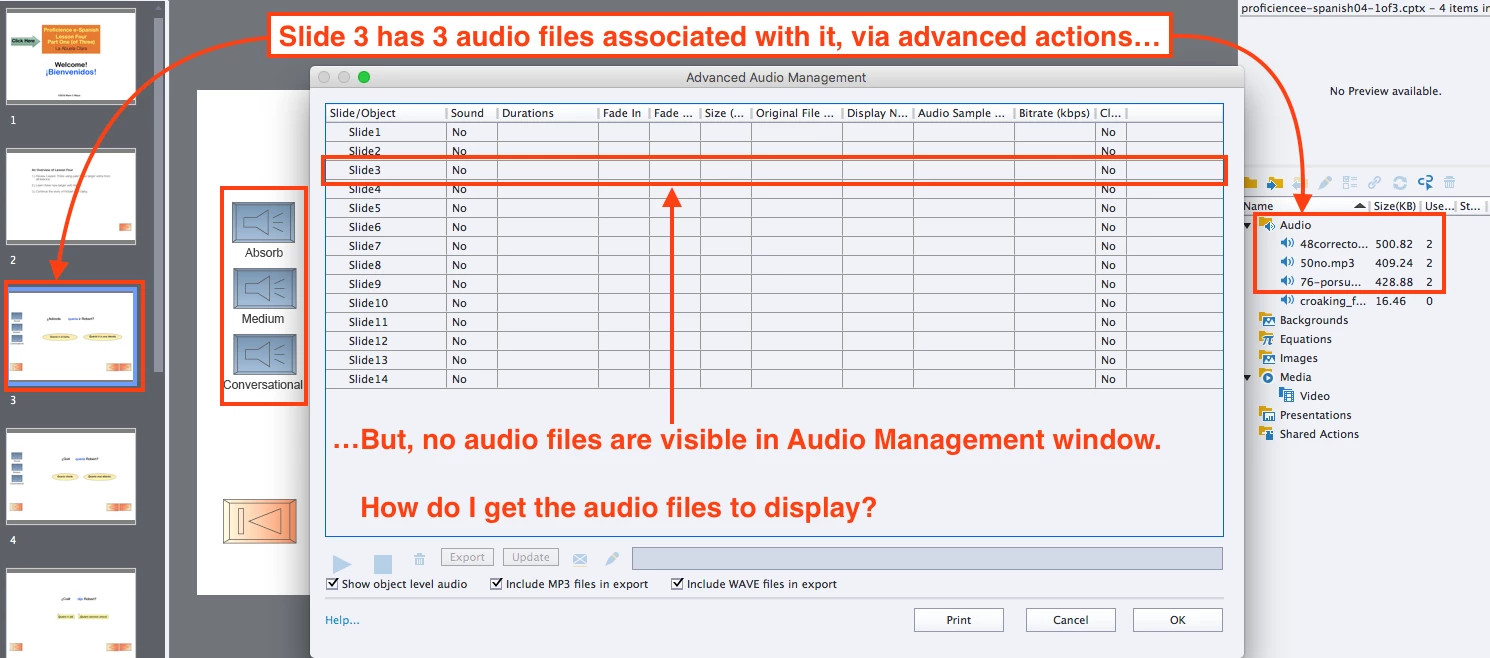
What needs to happen so the audio files will display as expected?

This topic has been closed for replies.

2 replies

Lilybiri
Legend
June 14, 2016

If you want to 'see' audio clips that are played with the Play Audio command in the Audio Management panel, you could replace them by what I label as 'Audio objects'. Those are objects that have no fill nor stroke but just audio attached to them. The clip will play when you use the Show command, and stop when you use the Hide command. Before the Play Command was added, this was the only way to have audio on top of slide audio. Moreover it is still the only way to have multiple audio clips playing at the same time (on devices that support it which is not the case for all mobile devices). More information:

Audio Objects: Control them! - Captivate blog

5deMayoAuthor
Participating Frequently
June 14, 2016

Lilibiri,

Thanks for that creative "experience-based" workaround. :-)

Mark

RodWard
Community Expert
Community Expert
June 14, 2016

If you look at the left-most column in the Advanced Audio Management dialog you will see that it only shows audio files related to objects and slides.

Are you perhaps playing these audio files via a Play Audio action using Advanced Actions?

If so, this will mean the audio files are not attached to any objects or slides and would therefore NOT appear listed in the dialog.

They WILL be listed under Audio in the Library, but to find their duration there you would need to double-click on each file and check it's details in the Audio Properties dialog....one file at a time.

5deMayoAuthor
Participating Frequently
June 14, 2016

That is indeed the case. Thanks for enlightening me about that.