


Inspiring
May 23, 2022
Answered

Audio off/on entering new slides

  • May 23, 2022
  • 2 replies
  • 428 views

In my project each slide has slide audio. I've created a multistate button that toggles audio on and off. Since this is a responsive project and the button is in a fluidbox, I know I can't display it for the rest of the project.


I have my Sound Button and its various states.
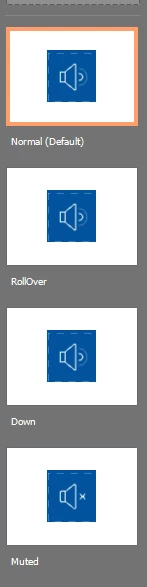
I also have and advanced action, Mute_Unmute:
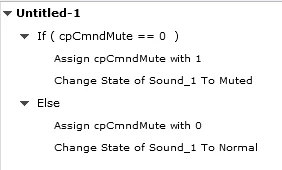
I figure this is easy enough to make a shared action for my various Sound_# buttons on each slide. 


I was wondering if I could make an Advanced Action on slide entry which basically works like so: if slide audio has been toggled off, then it remains muted on subsequent slide entry and the sound button on that slide is in its muted state. I want to make it so that if the user has muted the audio, then the audio on subsequent slides stays muted until the user unmutes the audio and since this involves multiple objects I figured I'd need a conditional action on entry to the slide to make this happen. Any thoughts?

    This topic has been closed for replies.
    Correct answer Paul Wilson CTDP

    Here is my take on your question. https://youtu.be/RccnzyF3DNI 

    2 replies

    Paul Wilson CTDP
    Community Expert
    Paul Wilson CTDPCommunity ExpertCorrect answer
    Community Expert
    May 23, 2022

    Here is my take on your question. https://youtu.be/RccnzyF3DNI 

    Paul Wilson, CTDP
    Kenny5FB6Author
    Inspiring
    May 23, 2022

    Thank you for your help. Yours and Lilybiri solutions both worked.

    Lilybiri
    Legend
    May 23, 2022

    I know, it is very annoying that you cannot time for the rest of the project in a Fluid Boxes project.

    First tip: do not use the Change state command, but use Go to Next state, since you really have only two interchangeable states: the Normal and the Mute state. You can even take out the Rollover and Down state, since they are not relevant if I check your screenshot. I have described this workflow in an old post, and a new version is in the eLearning community but I cannot access any of my blog posts since a week due to bugs in that portal. Here is the old post on my blog, example is still SWF but the idea is still valid:


    http://blog.lilybiri.com/1-action-equals-5-toggle-buttons

    This simplifies your shared action, because you do not need to use the states as parameters, only the button.

    For your last question, it is rather simple, since the system variable takes care of the audio and is already toggled, you only need to change the state:

    IF cpCmndMute is equal to 1

       Go to Next State ButtonThisSlide

    ELSE

       Continue


    You can convert this to a shared action, with one parameter: the button on this slide.

    Kenny5FB6Author
    Inspiring
    May 23, 2022

    Thank you for your help. This worked!