Audio "pre-amp" settings
Captivate v5.5
I opened a project that was created in v4 with v5.5 in order to edit it.
I needed to add some slide with audio and change some of the audio on some of the existing slides.
When I came to check my work the new audio was at a very low volume level compared to the original slides (created in v4).
After checking all sound settings on my PC and within Captivate I noticed the following "Pre-amp value":
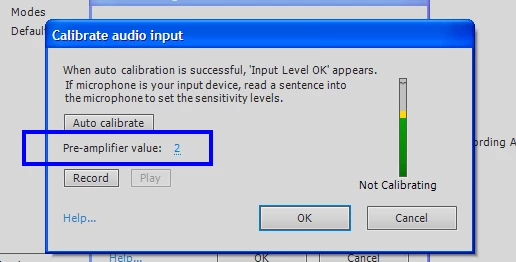
I dont recall what the value was but I moved it up to "2" and that appears to have solved the problem.
1. Is there a suggested best value for the Pre-amp" ? What level do you have yours set to ?
2. Is setting the "pre-amp" value something you should be made aware of when you first launch Captivate ? If I had been aware it would have saved me a lot of wasted time.
Noel
 AdChoices