
Known Participant
February 19, 2016
Answered

Audio Trigger

  • February 19, 2016
  • 1 reply
  • 274 views

Hello, I have an audio file that is being called up within an advanced action.  I would like to disable a button until the end of the audio file is reached, and then have it enabled once the audio file ends.  I can't seem to find a way to do this using actions. Any other methods?

Thank you,

Jeff
    This topic has been closed for replies.
    Correct answer Lilybiri

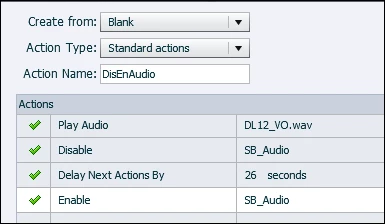
    Wanted first to double-check. You need to know the exact duration of the audio clip. For this example I created that was 26secs (Properties on audio in Library gives that info). This standard advanced action works for me:

    If you want to use it multiple times, you can turn it into a shared action.

    1 reply

    Lilybiri
    Legend
    February 19, 2016

    Which version do you use? I want to know if you have the command 'Delay Next actions...." which is only available in Captivate 9.

    Jeff AluAuthor
    Known Participant
    February 19, 2016

    Sorry to include that I'm using Captivate 9!

    Lilybiri
    LilybiriCorrect answer
    Legend
    February 19, 2016

    Wanted first to double-check. You need to know the exact duration of the audio clip. For this example I created that was 26secs (Properties on audio in Library gives that info). This standard advanced action works for me:

    If you want to use it multiple times, you can turn it into a shared action.