
elearningbuilder11
Inspiring
February 2, 2018
Question

Audio wont load/trigger/fire in HTML5

  • February 2, 2018
  • 2 replies
  • 1096 views

Hello,

I am at am impasse so I am sending this to the CP gods and goddess.

I have an "I need a hint" button appear on the slide, for remediation, when students choose the wrong (false) option on a concept checking slide.

Here is the advanced action for the 'I need a hint' button:
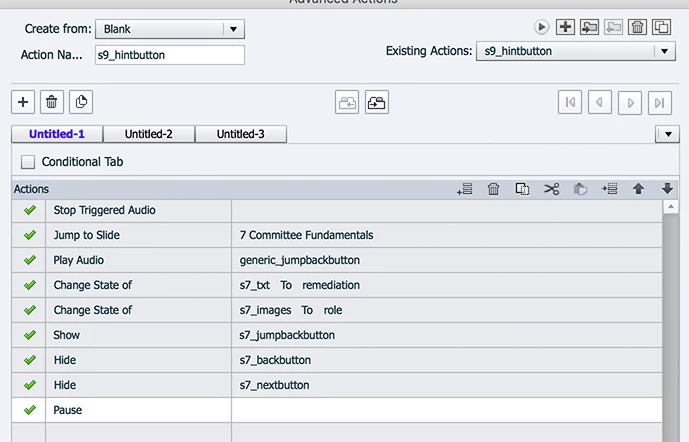
However, no matter what I do, I cant get the 'play audio' file to play when the button is clicked, and it jumps to the correct slide, slide 7.

Any advice or direction would be helpful.

Thank you.

This topic has been closed for replies.

2 replies

Lilybiri
Legend
February 2, 2018

Why do you stop triggered audio? If you use the command 'Play Audio', any other audio that was started with a similar command and another clip is stopped automatically. Unnecessary command.

Yo end with a Pause command, why? You are showing a button, doesn't it have a pausing point? The effect of the command 'Pause' is not totally the same as a 'milder' pausing point. Have a look at this movie:

http://www.lilybiri.com/published/PauseTypes/index.html

It is not clear to me which items are on which slide? The buttons you hide/show are on which slide? Why does the 'hint' have to be heard on another slide than the hint button?

elearningbuilder11
Inspiring
February 2, 2018

Hi, Thanks for your reply.

The 'stop triggered audio' and 'pause' commands are in there because if they aren't, the audio narration plays, and if students do not wait until it finishes before they click another button that also has narration, the sound clips overlap and nothing can be understood.

If both of those commands aren't there, the audio narration overlaps, no matter what I do.  Adding them is this only way I could get it to not overlap, or play at the same time when clicked.

Now I am having the reverse challenge, I cant get it to PLAY in the above script no matter what I do.

Lilybiri
Legend
February 2, 2018

Stop Triggered audio has NO effect whatsoever on slide audio, only the PAUSE command can stop slide audio. That is what I explained in that movie (did you watch?) and in my sequence of articles about the timeline.

Do you need slide audio? That is the crucial question: it is only really needed when you want to use the CC feature of Captivate.

This is not really the place to explain the TImeline, I created tons of articles about them, expeically the differences between all the audio types and the way they react to a Pause command and to a Pausing point (which is NOT the same). You don't believe lme when I say that Stop Triggered audio is unnecessary.  I am very sure about that, but when there is no trust, it has no sense to continue to explain.

elearningbuilder11
Inspiring
February 2, 2018

P.S.

Everything else works fine.

Thank you.

RodWard
Community Expert
Community Expert
February 2, 2018

I do believe this post marks a significant event.

Lilybiri, the Advanced Actions Queen, has just been promoted to the status of Goddess!

Until this moment I never realised it was possible to achieve ascension and deification simply by answering questions on this forum. I mustn't be getting all my memos.

Lilybiri
Legend
February 2, 2018

Maybe people want to get rid of me that way? I feel very human....getting wet in Belgian rain, shivering in the cold of railway station...