Participant
January 31, 2014
Answered

Background image from one slide appearing in all slides after and I can't remove it

  • January 31, 2014
  • 1 reply
  • 497 views

Hello,

I'm modifying a course created with Captivate 5, in Captivate 7 and for some reason the background image from slide 35 is appearing in all slides after that one and I can't remove it. The most interesting thing is that when you look at the slides in the film strip they look different (like the original) than the one on the work area which contains the background image I'm trying to remove (screenshot below).
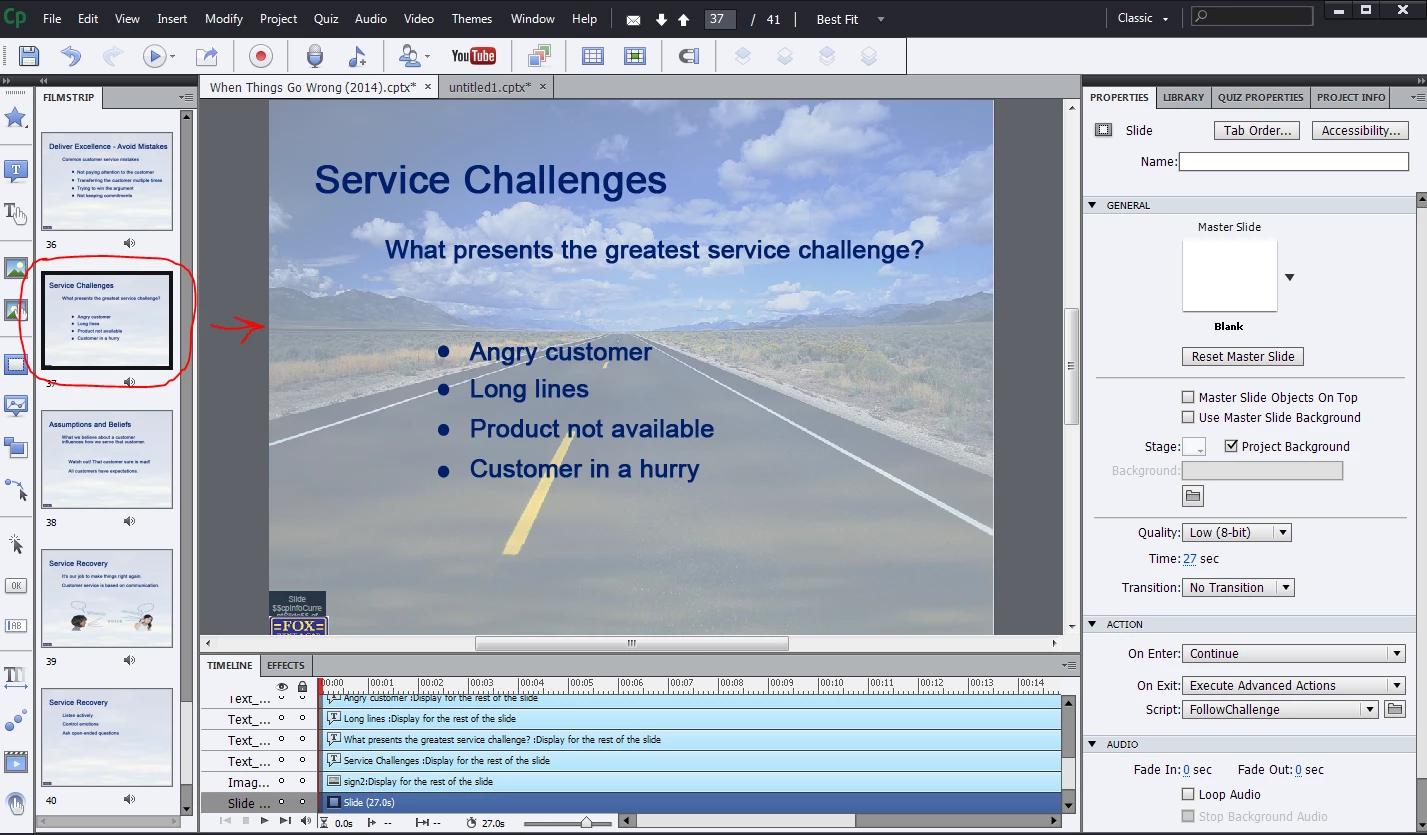
Any ideas or comments?

Thank you.

This topic has been closed for replies.
Correct answer Lilybiri

Can you check the Timing accordion (not visible on screenshot)? Is it perhaps set to display for rest of project?.

Or is the image on the master slide used for the other slides?

1 reply

Lilybiri
LilybiriCorrect answer
Legend
January 31, 2014

Can you check the Timing accordion (not visible on screenshot)? Is it perhaps set to display for rest of project?.

Or is the image on the master slide used for the other slides?

Participant
January 31, 2014

Hi Lilybiri,

Thank you for your prompt response. That was it!!!! You are awesome! I tried so many things and I don't know how that setting changed to "rest of project". Great thing to check next time.

I greatly appreciate your help.

Have a great day.

Lilybiri
Legend
January 31, 2014

Thread is still marked Unanswered? More problems?