
Inspiring
April 4, 2017
Answered

Background music is adjusting behind narration

  • April 4, 2017
  • 2 replies
  • 1682 views

Hi.

I'm using Captivate 8 and have background music with narration. I've turned off the 'Adjust background audio volume on slides with audio' option, but on the first slide that has the background music, it's still very quiet until the narration has finished. It's fine on all the following slides with narration, but on the first one it begins really quietly, then suddenly jumps to the correct volume once the narration has finished.

The fade in and fade out is set to 0 seconds.

This doesn't occur when I open the project in Captivate 7 - only in Captivate 8.

Any thoughts on how to resolve this?

Here's a screenshot of my background audio settings:
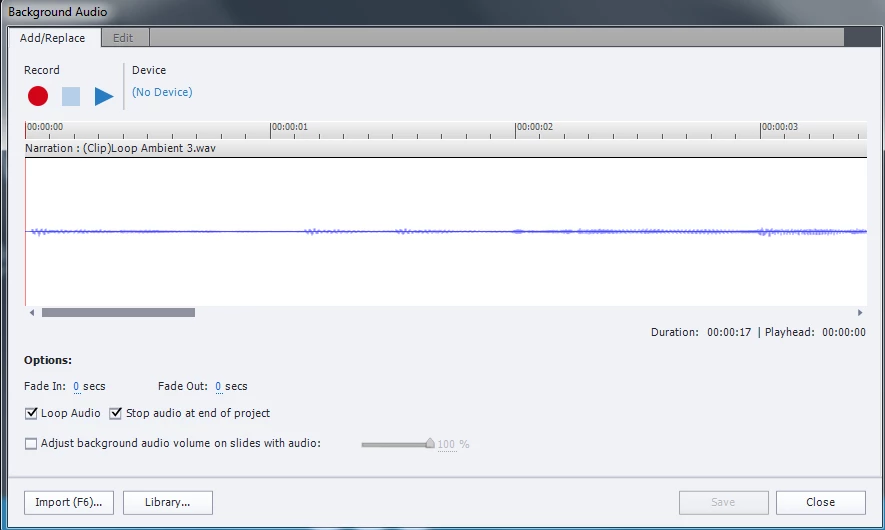
Thanks.

This topic has been closed for replies.
Correct answer scaheducation42

I suddenly had a similar issue pop up today, where the first slide was one volume and the it suddenly jumped up in volume on all subsequent slides, even if you go back to the first slide (has never been an issue before). I even tried creating a new project and copying my slides and reimporting the background music fresh, and the same issue happened.  Couldn't figure it out.

So what I did is I turned back on the option to adjust the background audio volume on slides with audio, but I set the percentage to nearly 100%. technically, it doesn't solve the issue, but it amounts to the same thing essentially. My background music is staying a constant volume throughout the project now.

2 replies

scaheducation42Correct answer
Inspiring
May 23, 2017

I suddenly had a similar issue pop up today, where the first slide was one volume and the it suddenly jumped up in volume on all subsequent slides, even if you go back to the first slide (has never been an issue before). I even tried creating a new project and copying my slides and reimporting the background music fresh, and the same issue happened.  Couldn't figure it out.

So what I did is I turned back on the option to adjust the background audio volume on slides with audio, but I set the percentage to nearly 100%. technically, it doesn't solve the issue, but it amounts to the same thing essentially. My background music is staying a constant volume throughout the project now.

cowmareAuthor
Inspiring
May 24, 2017

Awesome - that's sorted it out.

Thanks!

cowmareAuthor
Inspiring
May 17, 2017

*Bump*

Anyone got any thoughts on this? I'm still getting this issue and it's rather frustrating!

Thanks.

Inspiring
May 17, 2017

First, test it out on other computers or with different browsers as it may just be an issue with your personal computer settings.

Next best thing you can do is to just edit that particular part of the background music on the first slide in Audition or another editing software to make it louder. In Audition, I think it is Effects -> Amplitude and Compression -> Amplify..... and slowly adjust the music to be louder until you notice the change in your course when you test it. Be sure to save a backup copy because Audition saves over the original file.

Have you tried adjusting the percentage slider to different settings next to the adjust option?

cowmareAuthor
Inspiring
May 17, 2017

Hi.

I'm unable to test it on different computers, as I only have Captivate 8 on one PC. I also can't run it on different browsers, as Flash doesn't work on Chrome on my work PC and the only other browser I've got is Internet Explorer.

I can't adjust the background music because it would then become too loud when it loops (it's only too quiet while the first bit of narration is playing - after that it's fine, so if I make the actual file louder it'll be way too loud for the rest of the project).

Does anyone else notice this? It seems like a bug with Captivate 8.