German, can learn some more Captivate terminology.
May I ask you to post screenshots of the Preview for any advanced action? Much easier to read. You find it in the top right control menu, first button (arrow). Have a blog explaining all details of the Advanced Actions dialog box:
http://blog.lilybiri.com/advanced-actions-dialog-box-in-captivate-2017
Will try to summarize what the behavior of audio is, when pausing the timeline. Have also multiple blogs about that, but don't want to fill this answer with links:
- Background audio cannot be paused, not even by the Pause command. It can be muted with all the other audio using the Mute command or by toggling the cpCmndMute variable. If there is slide audio on the slide, you can stop background audio in the slide properties.
- Slide audio can be paused by an interactive object like a button, if you activate that option in the button Properties. However this is not possible for quiz slides, score slides, and Drag&Drop slides.
- Object audio cannot be paused by the pausing point of a button, nor by the Pause command. Only way is to hide the object to which the audio is attached.
- Play Audio clips cannot be paused by a pausing point nor the Pausing command when the clip has started. It can be stopped (not paused) by 'Stop Triggered Audio' or will stop automatically when another clip is started with the Play Audio command.
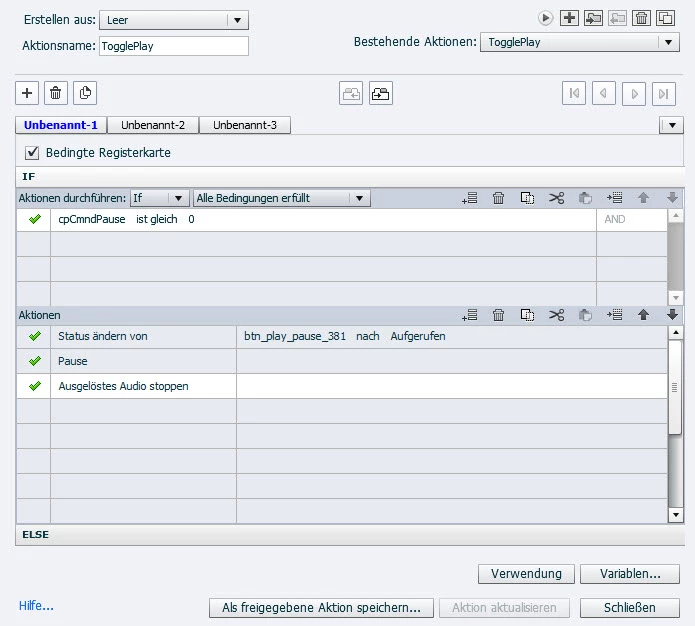
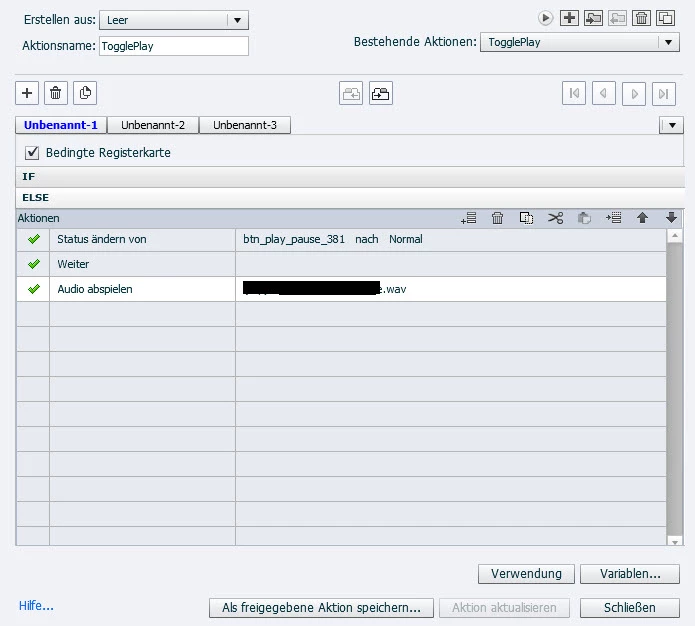
In the action I see:
- Audio abspielen, which is probably 'Play Audio'
- Ausgelöstes Audio stoppen: which is probably 'Stop Triggered Audio'.
That advanced action will indeed stop the audio clip, not pause it, and if you use Play Audio again, it will start from the beginning.
Only audio which can be paused and continue where is was paused is Slide Audio.
I am sorry about the fact that you'll have to translate the terminology... Ask if something is not clear.



 AdChoices