
Participating Frequently
July 20, 2016
Question

Basic object's style properties not available

  • July 20, 2016
  • 2 replies
  • 195 views

I sometimes (seems to be random) have this problem where, for any selected object on a slide, its style properties are not all available. For example, for the object selected on a slide, I cannot edit its fill colour or any of its stroke properties:

I need to see the following:
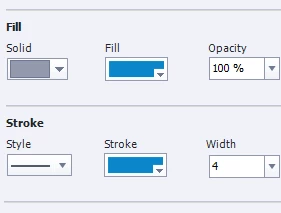
Sometimes, if I close Captivate and open it again, the properties display correctly, but not always.

How can I fix this?

Thanks.

    This topic has been closed for replies.

    2 replies

    BDuckWorks
    Inspiring
    August 8, 2016

    Try clicking between the options and actions panels, this may force Cp to re-assess what options should be active.

    Or try clicking another object on the screen, then click back to your target object.

    Lilybiri
    Legend
    July 20, 2016

    Since the change in UI with CP8 this is happening sometimes, interface is not as stable as was CP7 interface. I cannot really offer you a fix, only some recommendations to keep it happening less frequently:

    • Clear cache regularly
    • Try resetting the workspace (easier if you use the Expert UI, because you can have multiple workspaces)
    • Close and restart Captivate frequently