

Participating Frequently
October 30, 2021
Question

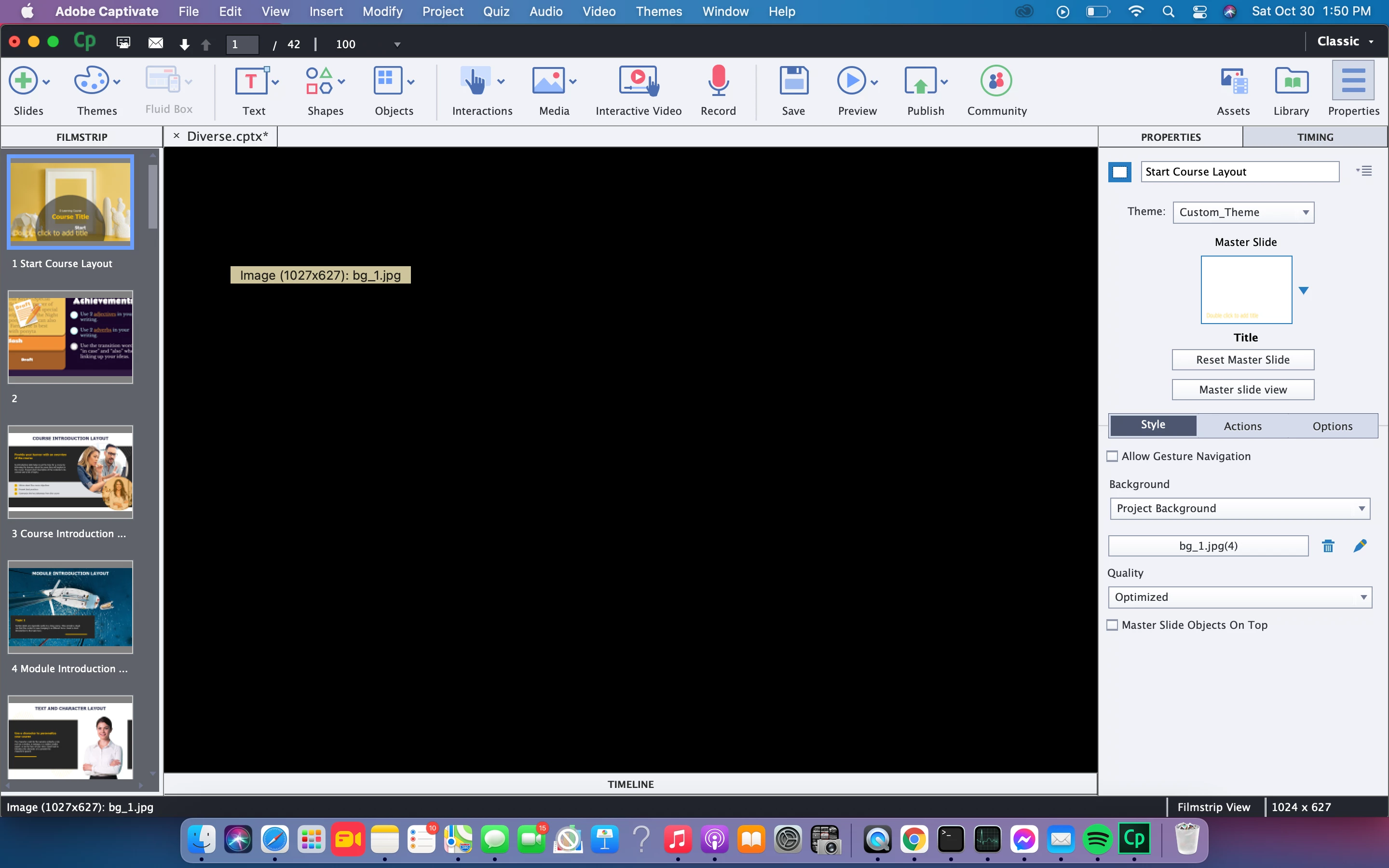
Blank Highlighted slide

  • October 30, 2021
  • 1 reply
  • 268 views


Hey All, 


I am hoping someone can tell me why when I click on a slide in film view my main slide page stays black?



    This topic has been closed for replies.

    1 reply

    Paul Wilson CTDP
    Community Expert
    Community Expert
    October 31, 2021

    I'm a Windows user, but I recall seeing this issue specifically with macOS. So be sure you are running an Intel Mac and make sure you update to the latest version of Adobe Captivate 2019. Check out the following post for more details...

    https://community.adobe.com/t5/captivate-discussions/captivate-2019-release-on-macos-big-sur-macos-11/td-p/11696362 

    Paul Wilson, CTDP
    Participating Frequently
    October 31, 2021
    Thank you!! That was so helpful.

    I am running an Intel Mac OS. I am going to uninstall and re-install Adobe
    Captivate and see if that fixes it.
    RodWard
    Community Expert
    Community Expert
    October 31, 2021

    Just uninstalling and reinstalling isn't the answer.  You need to make sure you install the specific version of Captivate that is compatible with your OS.  The normal download install file for Captivate doesn't necessarily give you that specific version.