
Participant
October 16, 2015
Answered

Blank screen after a drag and drop interaction

  • October 16, 2015
  • 1 reply
  • 286 views

Hey, I'm back.

I have a quick question about a drag and drop interaction in Captivate 8. Right now, it's set to continue to the next slide after three failed attempts (with a failure caption) or to show a success message on success then move on to the next slide. However, when I publish it, it goes to a blank screen for a few seconds after I finish the drag and drop interaction and then goes to the next slide. The rest of the slides have text entry boxes and none of them have the blank screen between them.

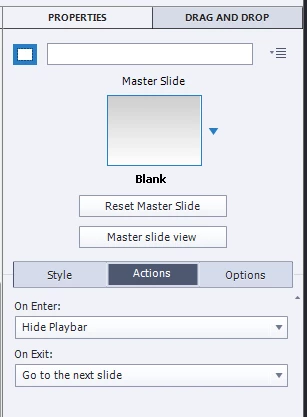
Does anyone know what could be going on? I feel like there's a setting I'm missing or something. I've attached screengrabs of the slide settings and drag and drop settings. Please let me know if you need any more information.

This topic has been closed for replies.
Correct answer Lilybiri

Why did you change the pausing point to such a very short 0.1 secs, what is the idea behind that? Yesterday I warned already another user that such short duration is not at all recommended. D&D slides have a lot of code built in and you are adding an action On Enter to hide the playbar. How long is this slide in total? The pausing point is not visible on the timeline, but your change will cause this situation:

  • active part of the slide is 0.1sec
  • inactive part of the slide is duration of the slide minus 0.1sec; if you kept the slide duration at 3 secs, that means, 2.9secs
  • when the submit button is clicked and attempts are exhausted the actions OnSuccess or OnFailure are executed: both will release the playhead in your case, and the playhead has to continue on the timeline for 2.9secs
  • if your objects are not timed for the rest of the slide, but end before that end, at a certain moment you'll see indeed a 'blank' slide.

1 reply

Lilybiri
LilybiriCorrect answer
Legend
October 16, 2015

Why did you change the pausing point to such a very short 0.1 secs, what is the idea behind that? Yesterday I warned already another user that such short duration is not at all recommended. D&D slides have a lot of code built in and you are adding an action On Enter to hide the playbar. How long is this slide in total? The pausing point is not visible on the timeline, but your change will cause this situation:

  • active part of the slide is 0.1sec
  • inactive part of the slide is duration of the slide minus 0.1sec; if you kept the slide duration at 3 secs, that means, 2.9secs
  • when the submit button is clicked and attempts are exhausted the actions OnSuccess or OnFailure are executed: both will release the playhead in your case, and the playhead has to continue on the timeline for 2.9secs
  • if your objects are not timed for the rest of the slide, but end before that end, at a certain moment you'll see indeed a 'blank' slide.
Participant
October 16, 2015

D'Oh! That was left over from messing around with the settings earlier. Changing it fixed the problem. Thanks for the help! Sometimes you just need to step back from the screen and let someone point out the really obvious solution.

Lilybiri
Legend
October 16, 2015

Great!