


Participating Frequently
August 11, 2023
Question

Blocks appearing during recording

  • August 11, 2023
  • 1 reply
  • 206 views

I have had this happen repeatedly when recording. It sometimes happens over and over again. Sometimes only after I've recorded and deleted the recording to re-do. But my past research showed that Adobe denied knowing it ever happened. Here's what it looks like:
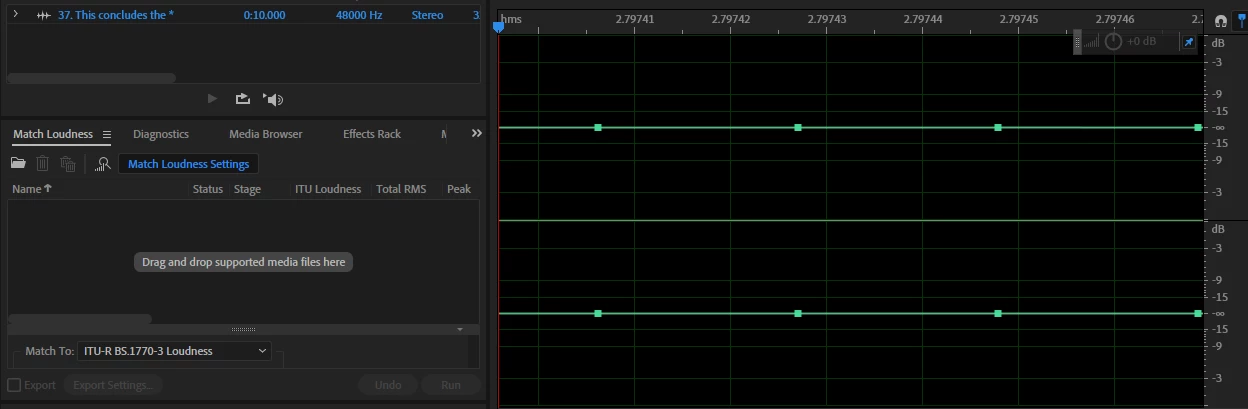
 

Once I stop, delete, and restart recording it USUALLY works, but sometimes I have to go thru this process over and over again.

    This topic has been closed for replies.

    1 reply

    Lilybiri
    Legend
    August 11, 2023

    Some questions:

    • Are you using Classic Captivate or the most recent version 12?
    • Is this in a software simulation or a Video Demo recording?
    • Can you explain what you mean by 'block'? I looked at the screenshot trying to find what you mean but in vain.
    Participating Frequently
    August 14, 2023

    Lilybiri - my mistake - I meant to post this for AUDITION. However, now I cannot find any way of deleting this post from Captivate. Any thoughts on that?

    Lilybiri
    Legend
    August 14, 2023

    I did see indeed that the screenshot looked like taken from Audition, but I thought is was a software simulation with Audition as target.

    As moderator I am no longer able to delete threads (used to be so before switching platforms). But I can lock this discussion. If you don't want it, please let me know.