
muchelleb
Inspiring
November 14, 2017
Question

Branching View doesn't update with new links

  • November 14, 2017
  • 1 reply
  • 625 views

Hello

I'm using Captivate 9.0.2.437

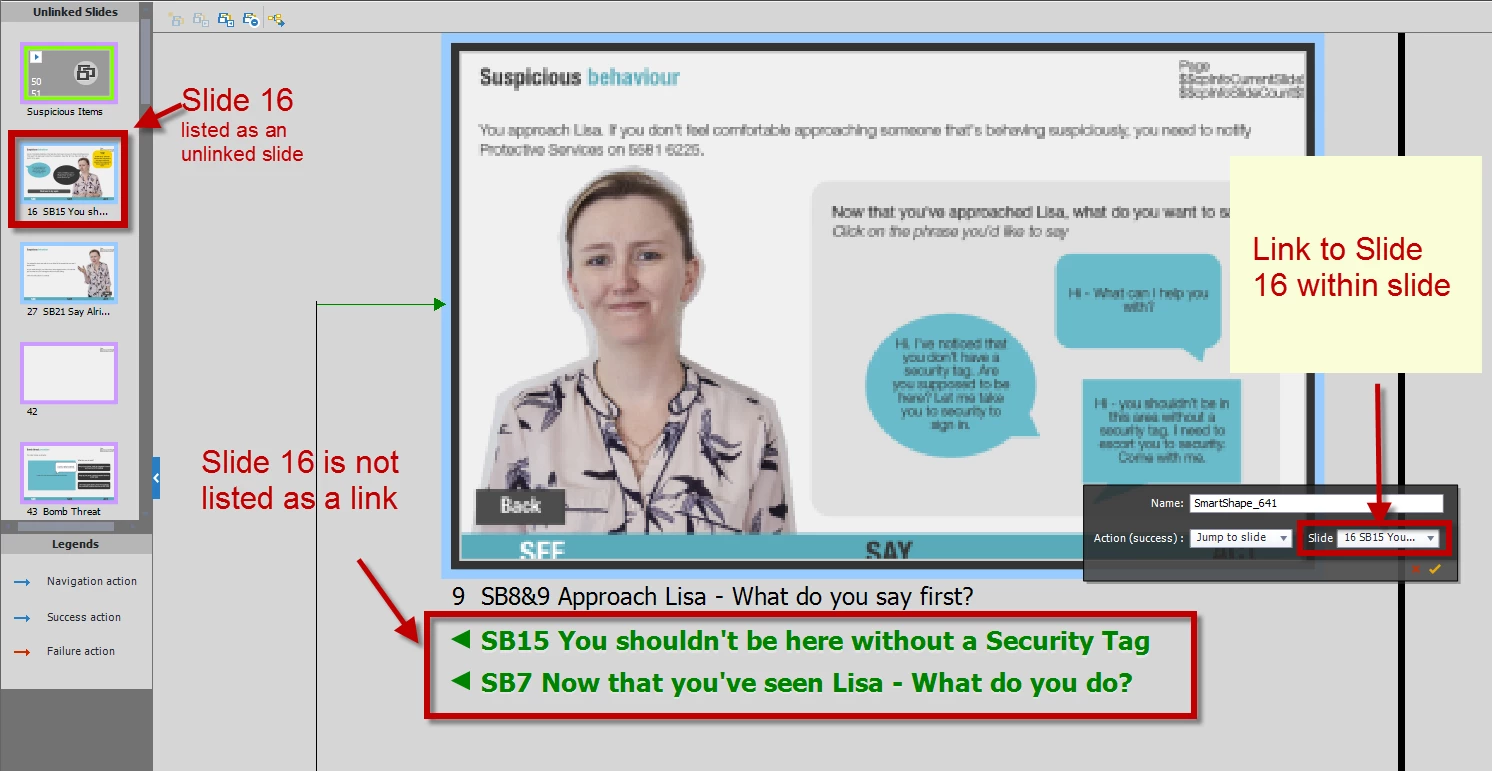
I'm using the branched view. When I update an action to jump to a different slide - the branched view doesn't change at all.

See image below - one of the buttons was changed to jump to slide 16. Slide 16 is still listed in the 'Unlinked slide' section. It also isn't listed as a linked slide underneath the slide in the branched view, or linked to in the branched view.

I have tried closing out of the branching view and opening it again. I've double checked the slide in the normal view to ensure that the button has definitely been updated, and it has.

Has anyone experience this before? Is there a way to 'refresh' the branching view - other than closing out of the program and reopening it again?

Thank you
This topic has been closed for replies.

1 reply

Lilybiri
Legend
November 14, 2017

Branching panel is rather limited, only direct branching will be shown, not branching that is done with an advanced action. That makes the panel not very useful, reason why it is so hidden. Personally I stopped using it since several versions because of those limitations. Very long ago I wrote one post about it, maybe I should just take it out of my blog.

muchelleb
muchellebAuthor
Inspiring
November 14, 2017

Thanks Lilly.

It's a shame - I really struggle to create branched eLearning when I'm looking at a list of slides - linking slides together and making sure everything is correct is really difficult.

The buttons don't have advanced actions, just simple 'jump to slide' actions. It's frustrating that the branching view doesn't update immediately.

Thanks,

Michelle

Lilybiri
Legend
November 15, 2017

Will try to double-check today.  Because of the limitatios of the Branching view panel, for really complicated courses I switch to other applications like Visio. If it is indeed correct what you describe, this should be logged as a bug. Will be back later.