



GeekyGirlRex7295714
Community Expert
Community Expert
August 7, 2019
Question

Branching View is not working

  • August 7, 2019
  • 7 replies
  • 1709 views

Hello Captivate Community:

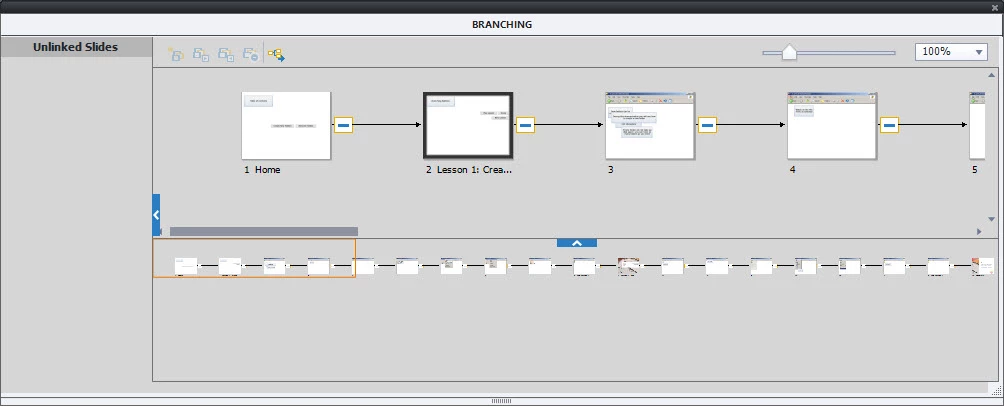
I have a Captivate 2019 file with two branches. The table of contents slide has two buttons: one jumps to the slide for the first branch (slides 2-10) and the other jumps to the second branch (slides 11-20). There are also a few other buttons that help to navigate between the table of contents slide and the two lessons) When previewed, the buttons all work just as expected. However, when I view them in Branching View, the branching does not show. It just appears as a straight line (picture below). What could be causing this?

Thanks in advance for your assist!
This topic has been closed for replies.

7 replies

Participant
February 11, 2021

Similar issue.


I have two sets of quiz slides in English and Swedish.

I can get them to jump to the right slides to begin with from a button on the first slide - English sends them to slide 2, Swedish to slide 4 then onto their respective quiz slides. 

What I cant seem to do is at the end of the English quiz slides jump past the Swedish slides to the results summary.


Lilybiri
Legend
February 11, 2021

You may have missed my answers. Do not use the Branching panel, you'll have to create custom navigation in this case. Use the Success and Last Attempt events of the last Quiz slide to execute the command 'Jump to....' where you point to the Results slide. Moreover with Branch aware, which yoiu probably have on, normal navigation has been disabled which probably also affects this useless Branching panel.

Participant
February 11, 2021

Thanks for your very speedy response. I did read your answers - what I failed to realise and mention was that I was using a random pool of questions and couldnt see the actions associated with the last slide outside of the branch view! Im now going to try to add a single question from the pool into the main project and set the navigation as you suggested. Many thanks!

Participant
February 4, 2021

Hello, did anyone ever find a fix to this issue?  I am working through training and the branch view is linear as previous screen shots have demonstrated.  My version is current and 11.5.5.553.  I searched related posts but didn't find an answer.

Thanks all,

Joe

Lilybiri
Legend
February 4, 2021

Forget about branching view, it almost useless. Only if you navigate directly the paths will appear properly. Whenever you use a condition for branching, using actions, that will not be the case.

Participant
February 21, 2020

Same problem. Version 11.5.4.613

Participant
May 21, 2020

Same problem. v11.5.4.613 - free demo version

Participant
September 23, 2019

I have the same problem, I'm working on a exercise in a class and the branching view is just a straight line of slides with no branches as you have shown. My adobe captivate is up to date so that didn't solve the problem, if anybody else has idea's I would like to hear!

Lilybiri
Legend
August 9, 2019

Can you click on the slide with the buttons to have it maximized, and check the actions on the buttons. Here is the link to that old post about Branching panel (didn't really change since that blog was written 10 years ago):

Unknown is Unloved (Flemish Proverb): Branching View - Captivate blog

GeekyGirlRex7295714
Community Expert
Community Expert
August 9, 2019

I tok a picture of the buttons on the first page...one goes to the next slide and the other jumps to slide 11.

I should mention that this is a student's file...not mine. When I do the exercise, the branching view looks fine. When she does the exercise, it does not. (In my class, several students had the same thing happen to them and several did not.) When I open her file, it

looks wrong on my PC as well. This is a picture of her file on my PC.

Writer | Developer | Facilitator | Geek!
Lilybiri
Legend
August 9, 2019

That is new information. Can you check the exact version number they are using?

Lilybiri
Legend
August 9, 2019

I don't see my answer here. Told that Branching view panel will only show direct branching, not if the branching occurs using advanced or shared actions. It has always been that way, and for that reason not so very useful anymore.

GeekyGirlRex7295714
Community Expert
Community Expert
August 9, 2019

Thanks, Lieve...but that's not it either. The branching is just a simple series of buttons that "jump to" other slides. Let me know if you have any other ideas.

Writer | Developer | Facilitator | Geek!
Paul Wilson CTDP
Community Expert
Community Expert
August 9, 2019

Make sure you update to the latest version which is 11.5.1.499. I'm presently running this version and while I don't think these updates are related to branching. I just did a quick test and everything seems fine with branching in the latest release.

Paul Wilson, CTDP
GeekyGirlRex7295714
Community Expert
Community Expert
August 9, 2019

Thanks, Paul. It is not a version issue.

Writer | Developer | Facilitator | Geek!