

BUG: Captivate / Adobe Connect Failure & Poor Documentation
I'm assessing Adobe Captivate and the Connect system together for LMS, and I'm just astonished at bugs and insignificant documentation that exists.
1) There is extremely limited documentation in the Adobe Captivate User manual https://helpx.adobe.com/pdf/captivate_reference.pdf on to how to upload to Adobe Connect other than "Choose the appropriate Project Name, server URL and Click Publish when completed".
OK.
Where in the Adobe Connect published guides do they tell you the appropriate Server URL for an upload?
I could find zero reference to it here http://help.adobe.com/en_US/connect/9.0/using/connect_9_help.pdf
2) Granted a call to support told me the cryptic server upload name which had nothing to do with any information I had from Adobe.
3) Once I could successfully upload a five-page trial course, I moved to a longer 15-page course trial. Captivate failed up upload.
4) Four hours later, I found the addition of a single "Knowledge Check Slide" to an existing one-page project causes the project to fail to upload to Adobe Connect. That's a pretty significant bug.
The failure noted is completely unrelated to the actual problem:
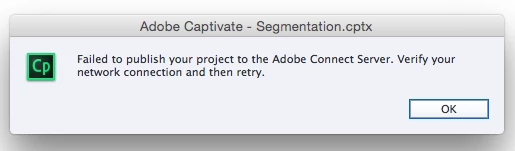
When the "Knowledge Check Slide" is removed, the project uploads successfully.
Remaining questions:
Am I the only one to notice problems like this in the most fundamental uses (five whole slides) of Captivate?
How do people figure out how to use Captivate and Connect other than calling for support?
Can't the company that produces documentation tools actually... document their tools?
Why are they paired if there's no documentation on the process of linking?
Did the use case of "course with a knowledge check slide" uploaded to connect elude testing?
What other slides were not tested with Adobe Connect?


 AdChoices