
Takiej
Known Participant
January 11, 2018
Question

BUG: Find and Replace displays nonsense text

  • January 11, 2018
  • 2 replies
  • 543 views

Captivate 2017 Windows 7 64 bit OS

I guess there is no longer a Bug Report form? They want you to post bugs in the forums now? If someone has a true bug form, I'd love the link, but this link does not have any sort of clickable object to open a form to list any details: Feature Request/Bug Report Form so I'll post in the forums...

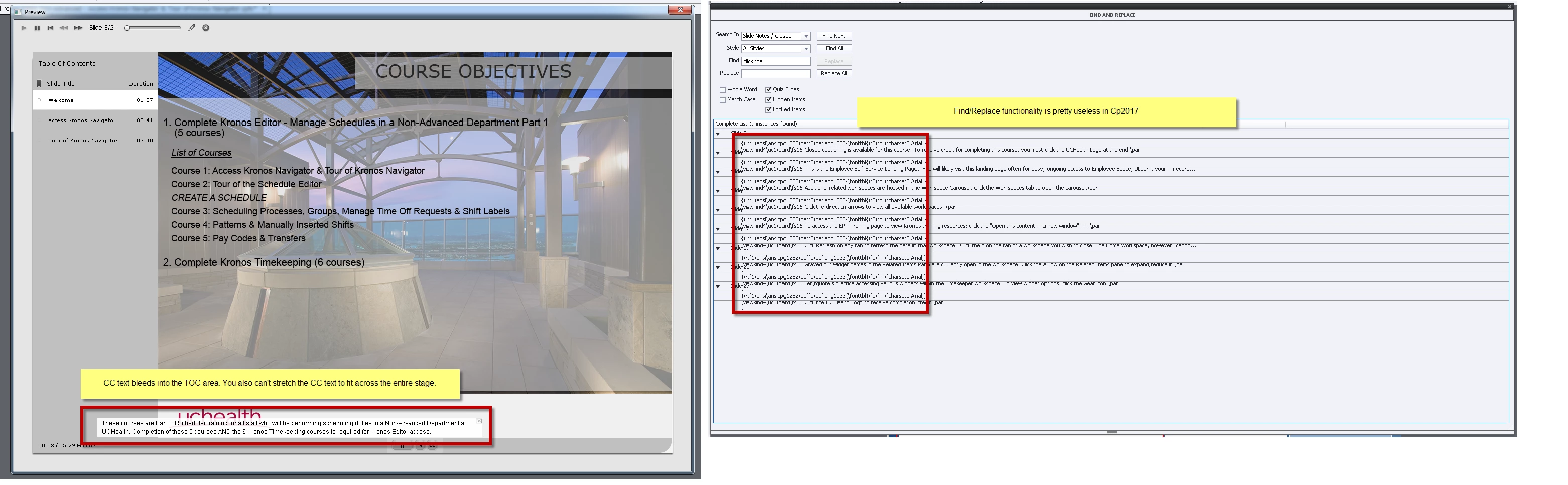
In previous Cp versions when you use the Find and Replace function, it would show the Slide number and your found text.

Now it just displays nonsense and obscures the Slide number.

Upgrading to Cp2017 has been a nightmare. I experience issues with the below items all the time and as such, I no longer use Captivate to create new projects.

CC placement is buggy - they are aware of it but no improvement in months.

Find/Replace functionality is useless - everything is obscured with programming text

Duplicate a slide - change the slide notes - slide notes on the orig slide also change

Thank you

Katie
    This topic has been closed for replies.

    2 replies

    Lilybiri
    Legend
    January 11, 2018

    You are in CP2017? It is a known bug, have logged it months ago. Here is the link to the form:

    Adobe Captivate

    Takiej
    TakiejAuthor
    Known Participant
    January 11, 2018

    Thank you very much for the direct link. I only see the below when I use Chrome or IE. Clicking "view all products" under the Products header in the black footer area only brings me to the Try it/Buy it page. So maybe it is a compatibility issue, but the direct link Lilybiri supplied worked in Chrome.

    I submitted a bug report for the Find/Replace bug. I already submitted a big report many months ago for the CC text issue.

    You may delete this if you feel it's not relevant to a forum thread!

    Thanks

    TinkerTrainer
    Known Participant
    January 11, 2018

    Katie,

    That's the same bug reporting form I use and I see a "Select Product" pull-down box on the left side of the screen, between the Terms and Conditions paragraph and the top of the black box at the bottom of the page. I wonder if you're having a compatibility problem.  I'm using IE11.

    Regarding your Captivate problem, I can't help. Sorry!