


Venky
Participant
August 7, 2023
Pregunta

Bug in Captivate 12(Project charm)

  • August 7, 2023
  • 3 respuestas
  • 1180 visualizaciones

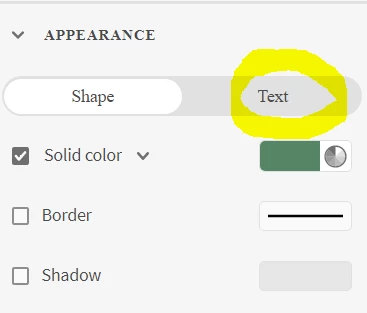
I was working on capturing the new simulation. After clicking on the click box appearance setting -> text option, the application got hanged and I had to close the app forcefully. Same issue popped out even after trying for 5 to 6 times.

I loved how the Captivate classic version was It was so handy to me. how to go back to the classic version?
Thanks,

Venky

    Este tema ha sido cerrado para respuestas.

    3 respuestas

    Adobe Employee
    August 8, 2023

    Hello Venky,


    Thanks for reporting this bug.

    Yes, it is a bug and we plan to release the fix in a few days.


    Regards

    Shreya


    Venky
    VenkyAutor
    Participant
    August 10, 2023

    Awesome. Thanks for the update Shreya.

    Any idea like when can we expect the next release?

    Lilybiri
    Legend
    August 7, 2023

    I have posted multiple times about the present support for both 11.8.2 and the new version 12. Moreover the software simulation in version 12 has not only many bugs, but is also very limited. One limitation is that you cannot add any object to a captured simulation slide which makes it pretty useless. This lacking feature and the bugs are on the priority list of the team.

    You need to be careful when reinstalling version 11, lot of users on this forum have reported issues. The proper way is first to update the present version of 11 to 11.8.2, which will rename that one to Classic Captivate before installing version 12.  That will avoid confusion and link the proper assets with both versions. You may need to clean the Preferences and/or delete the eLearning assets folder.

    Give it a try and keep to Classic Captivate at this moment, it also has Video Demo (lacking in 12) which may be great for replacing FMR slides which could lead to issues for HTML output.

    Venky
    VenkyAutor
    Participant
    August 10, 2023

    Hi @Lilybiri


    I installed captivate classic and it works. Yes I do agree with you thoughts but I feel this Project charm is gonna make our life simple. The team has to add few more features like exporting to video, Creating our own master template and few more main features has to be included also there is lot of bug in the application. Hopefully they will resolve the issues and we can expect a very good authoring application. Waiting for the BIG Change in Project Charm and L&D industry.


    Thank you.

    RodWard
    Community Expert
    Community Expert
    August 7, 2023

    If you have a subscription for Adobe Captivate you are allowed to have both Captivate version 2019 (11) as well as the new Captivate 12 on your computer.  However, there is no way to open your current Captivate 12 project file in Captivate 11 or vice versa.  The two versions are completely incompatible.  If you want to have your project as a Captivate 2019 file then you will need to recreate it from scratch in that version as a CPTX file. 

    Venky
    VenkyAutor
    Participant
    August 7, 2023

    Hi @RodWard,

    Yes I do have subscription. Thanks a lot for the update. This helps.