Participating Frequently
August 16, 2022
Question

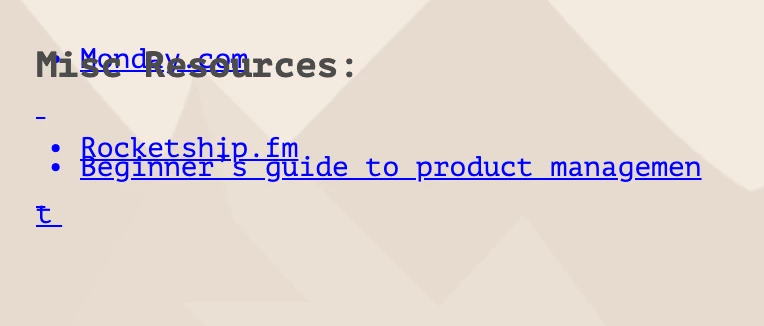
Bullet format gets messed up after project is published

  • August 16, 2022
  • 2 replies
  • 320 views

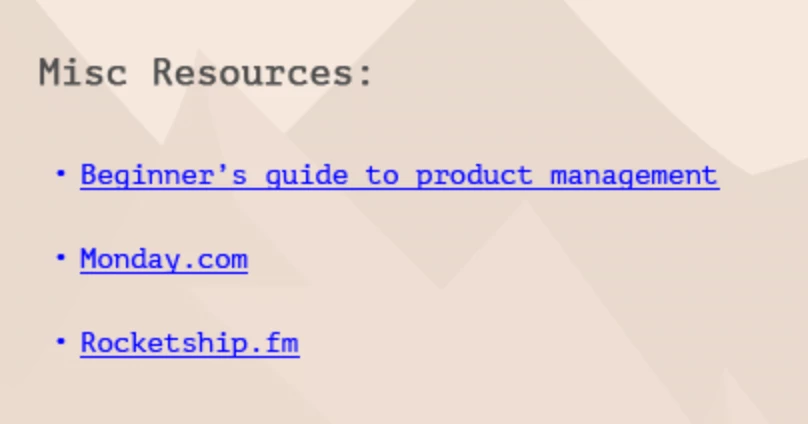
In preview:


After Publishing:


For additional context, I’ve tried removing the bullet point formatting, and still run into the same issue.  I have three other similar text boxes on the same slide, but this is this only one that has this issue. Any help or troubleshooting would be appreciated!

This topic has been closed for replies.

2 replies

Paul Wilson CTDP
Community Expert
Community Expert
August 16, 2022

Could you provide some additional information about which version of Adobe Captivate and what type of project this is from? For example, the latest version of Adobe Captivate is 11.8.0.586 for Windows or 11.8.0.710 for macOS. I ask about the project type because text-related issues can result from responsive design projects, but they could also be problems related to other situations. With a responsive design project, it could be related to the text object not being locked to a fluid box and is getting squished down when viewed on a device size that isn't usual. Another example can occur when text is copied from a source that might contain invisible formatting that came from Microsoft Office applications. If you are a Windows user, I like using a small free app called PureText, which strips out such formatting when you copy and paste it. It's available in the Windows Store.

Paul Wilson, CTDP
Participating Frequently
August 17, 2022

- I used a template I downloaded from online (which I believe was built for previous versions), which I believe is responsive. How does one update a theme to the Present CP version? I didn't even know that was a thing!


Lilybiri
Legend
August 16, 2022

Can you provide some necessary information please:

  • Which exact version are you using, offer the full version  number as found under Help, About Captivate. Just telling CP2019 is not sufficient since it covers many releases.
  • Which OS are you using and which version?
  • Is this a responsive or a non-responsive project?
  • Which Theme do you use? If it is a custom theme was it updated to the present CP version? Is this slide based on a custom master slide?
  • Since there is clearly something wrong with the font as well: do you use Websafe or Adobe fonts, or is this is a system font (to be avoided)?

Know that for a non-responsive project only F11, Preview HTML in Browser is a trustworthy preview method, the other methods use a temporary SWF output. Did you check with F11?

Participating Frequently
August 17, 2022

Thanks for the response!

- I'm on 11.8.0.710 for MacOS Monterey

- I used a template I downloaded from online (which I believe was built for previous versions), which I believe is responsive. How does one update a theme to the Present CP version? I didn't even know that was a thing!

- This is a system font within Captivate. I was not aware that those are to be avoided!

Lilybiri
Legend
August 17, 2022

Something is going awry on this forum, notifications are not sent automatically and I need to look in the forum to check if the threads I follow have updates.

You are not alone about ignoring the importance of Themes in Captivate, which is a shame.

You use a 'template' but I suspect it is not a cptl-file but a simple cptx file. If yes, many of those have hopelessly outdated or incomplete Themes, including the Quick Start Projects by the Adobe team as well. Themes had a serious update with version 11.5 and in consultancy jobs I had already to solve a lot of problems with outdated themes. That is the reason I asked about them.  Even self-labeled 'experts' ignore this feature of Captivate which is at its core since Captivate version 6.  You'll find lot of posts about themes in my blog. Here is the most recent one:

http://blog.lilybiri.com/themes-are-time-savers-what-is-new-in-11-dot-5

The most dangerous new feature is the use of multiple themes in one project, which has messed up several of the projects I debugged for clients, when used without realizing the consequences.

If this is indeed a responsive project with fluid boxes you NEED to avoid all system fonts. In a responsive project all text is generated on runtime (contrary to non-responsive projects where static text is converted to images to allow system font texts). I tried to explain use of fonts in this blog post:

http://blog.lilybiri.com/fonts-in-captivate

Your system fonts will not look what you want when the learner has not installed exactly the same font family. It will not be the reason for your present problem, which is probably due to the setup of the fluid box(es?) for this text. Could you insert a screenshot where those fluid boxes are visible for the text sentences?