That is not the easiest scenario. Do you want to use states for the popup information or different text containers (shapes or captions)?
You need indeed to define a user variable for each shape button: v_one, v_two.... v_last. They will act as Booleans, which means that they will have a default value of 0, that will be toggled to 1 when that shape button has been clicked. Example: for each shape button, the conditional action needs two decisions. The first (Always) has a condition 'IF 1 is equal to 1', which means it is always done, the second checks the values of all the variables and will show the previously hidden Next button if all have been toggled to 1. Here is a Preview of such an action, for 3 shape buttons, where I used states to show the different popups.
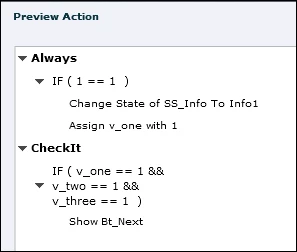
You can duplicate that action as many times as needed, only the first decision has to be edited (correct state and correct variable).
If you prefer show/hide instead of different states for the information popups, group all the popups (Gr_Info) and replace the Change State command by:
Hide Gr_info
Show Info_1
Since you also want to offer the same functionality when returning to the slide, you will have to set the values of all variables to 0 which can be done with an action triggered by the On Enter event of the slide. If you use states, you can uncheck the option 'Retain states on slide revisit'. If you use the show/hide approach, add the command 'Hide Gr_Info' to the On Enter action.



 AdChoices