
wc3
Inspiring
June 19, 2013
Answered

Button, button...whats going on?

  • June 19, 2013
  • 1 reply
  • 712 views

Hello,

Thanks to all who have answered my previous posts. You have all been very helpful.

New question, new day, new challenge..here goes;

I created a conditional action successfully (thanks to all who posted help for me) so I just wanted to create a button that runs the conditional action...but we will come back to this.

Now to the button.

I created a simple button; INSERT-->STANDARD OBJECTS-->BUTTON (as below) then I changed the "On Success" parameter to "Jump to Slide" and chose a slide at random as shown.
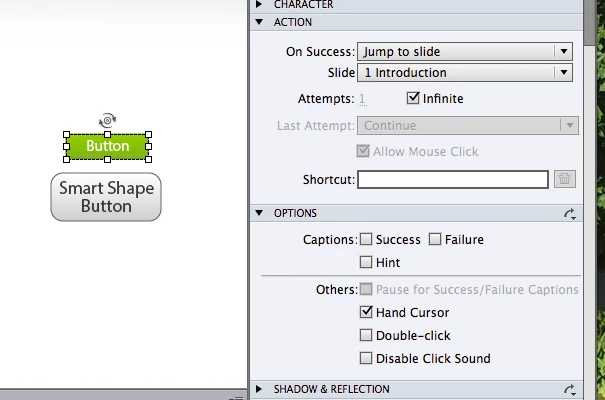
When I preview the course.. the button doesnt work. It does nothing accept make a click noise. Not what I wanted.

Have I done anything wrong? Is CP7 bugging out? Is it a glitch? I followed the exact steps in the downloaded CP7 manual and various captivate help website pages  online. According to those resources I have done it correctly. However it doesnt work.

Thanks in advance for your help.

    This topic has been closed for replies.
    Correct answer Captiv8r

    Sorry, but one other question. How exactly are you previewing? There are several options. For example, if you selected the "from this slide" or "next nn slides" preview, slide 1 will be unreachable.

    Cheers... Rick

    1 reply

    Captiv8r
    Legend
    June 19, 2013

    HI there

    What slide is the button on? Your image shows it should jump to slide 1. But if this is the slide it's on, it's not going to do much of anything.

    If perhaps you added the button to say, slide 20, then I'd be asking if you had scored objects between slide 1 and slide 20.

    Cheers... Rick

    wc3
    wc3Author
    Inspiring
    June 19, 2013

    Hi yes.. sorry... great question.

    The button is on slide 7.. im just testing the button to see if it works by having it jump to slide 1. 

    It doesnt work.. 

    Captiv8r
    Captiv8rCorrect answer
    Legend
    June 19, 2013

    Sorry, but one other question. How exactly are you previewing? There are several options. For example, if you selected the "from this slide" or "next nn slides" preview, slide 1 will be unreachable.

    Cheers... Rick