
Known Participant
February 11, 2019
Question

Button "Cancel" resume alert do the same than "Ok"

  • February 11, 2019
  • 1 reply
  • 676 views

Hi. Recentilly one of our student send us a queston that we couldn't asnwer properly. This is about the button "Cancel" "Cancelar" in spanish:
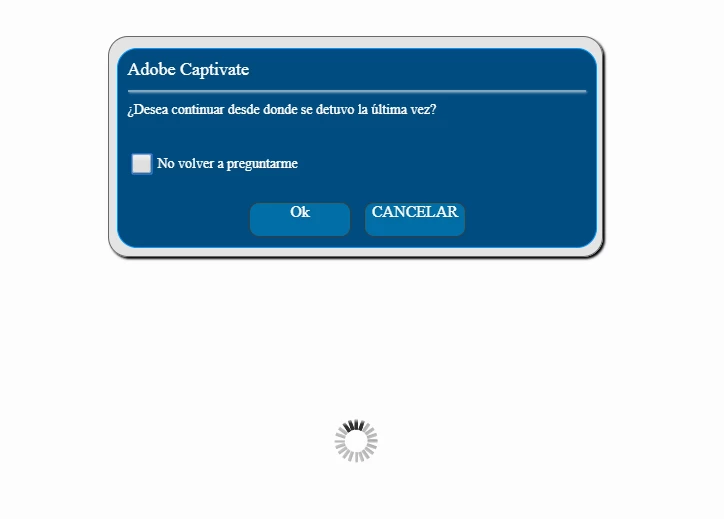
The problem is that if anyone click on that button (Cancel) do the same thing than "Ok". It suppose that "Cancel" will send you at the beginning of the course, am I right? I'm wrong?

I've trying to change the paramenter on TOC :

Project > Skin Editor > TOC > Settings > Self-Paced Learning.  Deselect it.

But if I do so, the proyect allways start from the beginning.

There is a way to set the course to allways resume last visited slide (without touching js library of CP)?

Thanks for your time. Waiting for your answers.

This topic has been closed for replies.

1 reply

Lilybiri
Legend
February 11, 2019

You are not reporting to a LMS but using the bookmarking by TOC?

If you uncheck the option 'Self-paced Learning' in the TOC settings, the course will always start at the beginning, it is like turning bookmarking off.  If you use a LMS the bookmarking is taking care off in the LMS.

Known Participant
February 11, 2019

Yes we are. We have uncheck the option:

The problem is with the "Cancel" button in the Alert when we retake the unit in our LMS (Moodle by the way). This button should take you to the beggining of the course, don't you? But, to us, don't do that. If we push "Cancel" reload in the last visited slide in the unit.

Lilybiri
Legend
February 11, 2019

In that case, reporting to LMS,  the bookmarking set up in the TOC is overridden.

Normally Cancel should take you to the start of the course, indeed. Did you check the project in SCORM Cloud? That is for testing to see if the problem is within Captivate or the LMS. SCORM Cloud is THE standard for SCORM.