



Buttons Are Forcing Slides to Advance When Viewing External PDF and URL
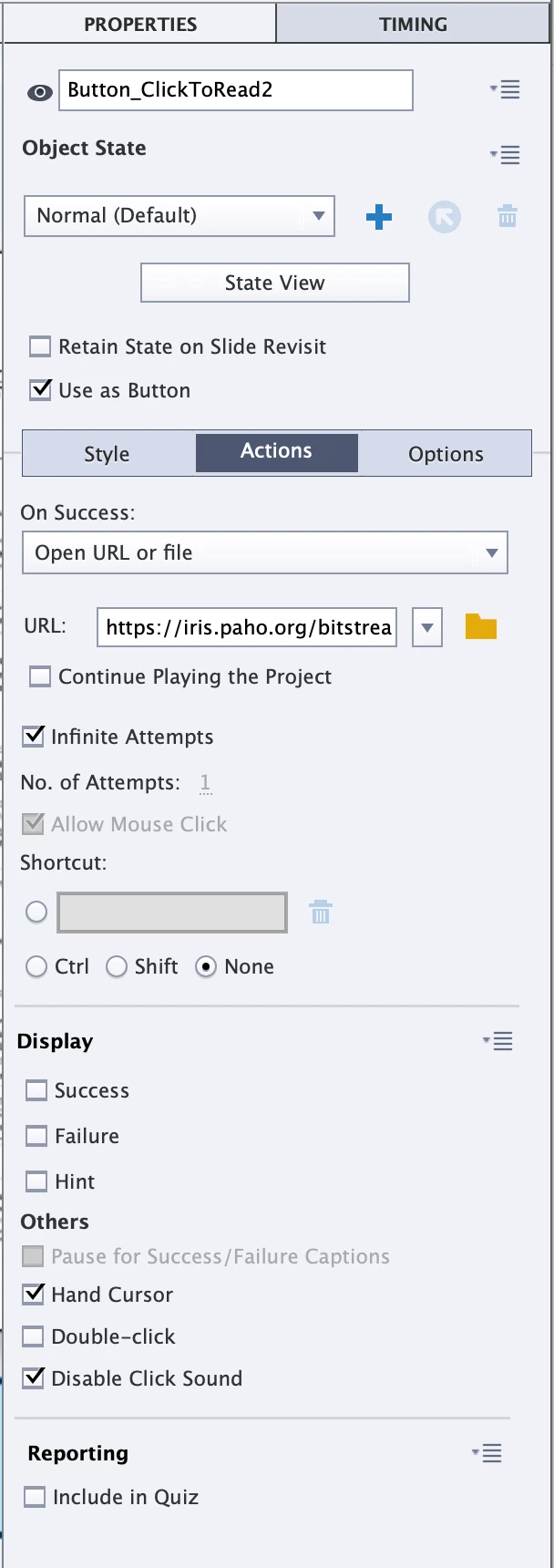
I have a slide with audio narration, three "View PDF" buttons that link to a new browser tab for each button, and a "Continue" button set to appear at the end of the narration that has the advance to next slide action set to it. The Slide itself has the Pause action set to it On Exit because I want the user to hear the naration, view and read the external PDFs in the new browser tabs, then return to the captivate tab and advance to the next slide. However, when the user views the external PDFs and returns to the Captivate project that slide advances automatically. I noticed that the buttons had the "Continue Playing the Project" box selected in the properties panel, so I deselected that for all three. I was able to preview the project and succesfully view all three external PDFs without the slide automatically advancing when I returned to it. However, after clicking the fist "View PDF" button, although the narration was still playing, the slide itself became paused and thus meant that the continue to next slide button I had intending to apear at the end of narration never showed up until I pressed play on the Captivate progess bar at the bottom and the time left in the slide progressed with no narration. I cannot figure out what is causing this issue as there doesn't seem to be any other options in the properties panel to toggle pausing and playing on and off for the buttons or slide, and why the narration would keep playing but the project slide would pause after deselecting "Continue Palying Project" for the PDF buttons. This is what the properties panel currently looks like for each button:
 AdChoices