Known Participant
August 22, 2016
Answered

Buttons not displaying over Accordion Learning Interaction in Prime

  • August 22, 2016
  • 1 reply
  • 373 views

Hello,

I have a course full of accordion learning interaction widget slides that seem to be malfunctioning once uploaded to Prime.

Issue: 

  • The widget seems to be hiding the button so that the learner won't know how to advance.
    • Sometimes, the button flashes for a second, but then quickly disappears.
    • If the user clicks in the area, the button does advance, but again, it's invisible, so the learner won't know to click there in the first place.
    • I have arranged the widget to the back of the slide and the button to the top.  Nothing works.
  • The widget also displays much smaller in Prime than it does in any of the local preview options in Cap 9.


This is how it displays in all Captivate 9 Previews:This is how it displays in Cap9.
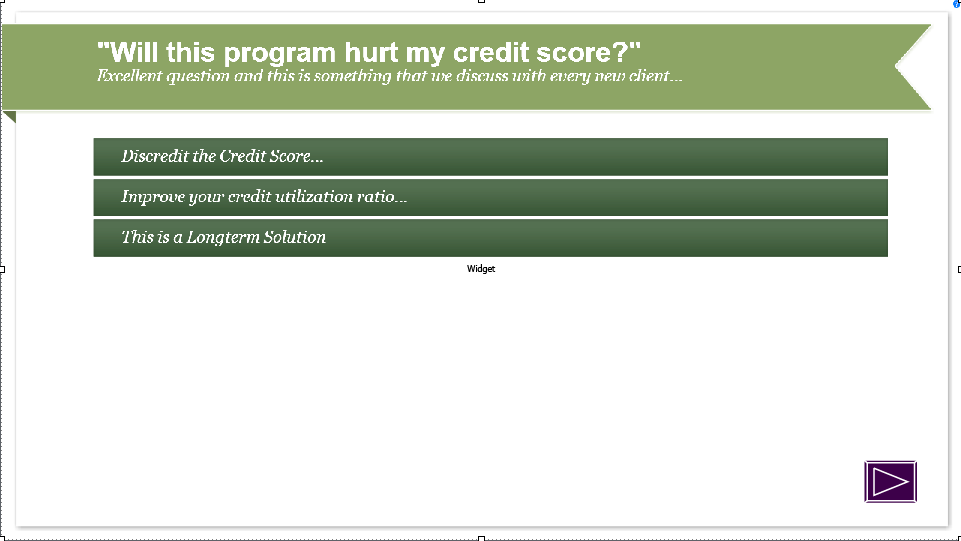
This is how it displays in Prime:This is how it displays in Prime

If anybody can answer this question, it would be of immense help.  I have taken advanced courses in Captivate 9, so I consider myself a knowledgeable user, so this seems like a glitch.  Is anybody else experiencing such a problem?


Thanks,
Jeremy 

    This topic has been closed for replies.
    Correct answer TLCMediaDesign

    Edit this file:

    C:\Program Files\Adobe\Adobe Captivate 9 x64\AdobeCaptivate.ini

    Change:

    UseWidget7 = 0

    To:

    UseWidget7 = 1

    1 reply

    TLCMediaDesign
    TLCMediaDesignCorrect answer
    Inspiring
    August 22, 2016

    Edit this file:

    C:\Program Files\Adobe\Adobe Captivate 9 x64\AdobeCaptivate.ini

    Change:

    UseWidget7 = 0

    To:

    UseWidget7 = 1

    Known Participant
    August 22, 2016

    I'm getting a message that says "Access is denied"

    TLCMediaDesign
    Inspiring
    August 22, 2016

    You'll need to get access to write to that folder. Sometimes you can overwrite the file. Copy it to your desktop, edit it there and the paste into the CP directory.

    Until you can write that file you can edit the published HTML (index.html) with this JavaScript.

    Find the line:

    lJSLoaded = true;

    And paste this above it:

    cp.model.data.project_main.useWidgetVersion7 = true;