sophieg3904268714285973
Known Participant
February 10, 2016
Answered

Buttons shrinking

  • February 10, 2016
  • 3 replies
  • 1366 views

Hi,

I've inserted two buttons in a screen using the Interactions tab in Captivate 9.

Every time I exit the screen they shrink, I resized a few times but they keep resizing to the same size as the text which is written on them.

See screenshot. I also can't centre the text after resizing.
    This topic has been closed for replies.
    Correct answer Lilybiri

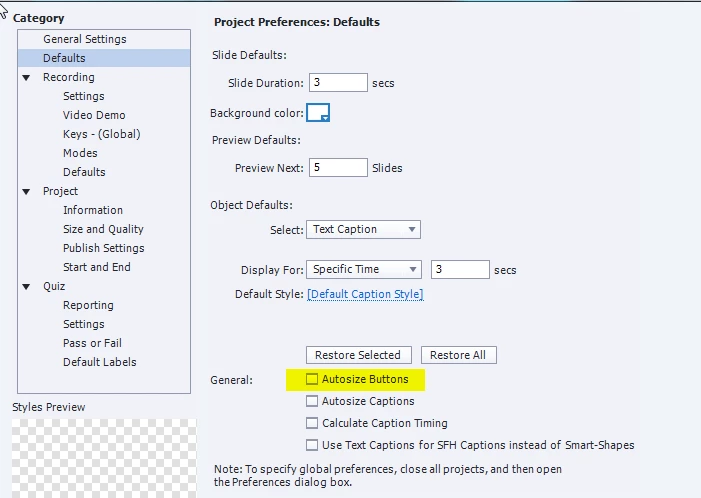
    This is due to having the setting Autosize Buttons checked, uncheck that option

    But you are confused: you always trigger an action by a button, that has nothing to do with the states at all. Buttons have 3 InBuilt states, you can add more custom states but a state can never trigger any action.

    3 replies

    Lilybiri
    LilybiriCorrect answer
    Legend
    February 10, 2016

    This is due to having the setting Autosize Buttons checked, uncheck that option

    But you are confused: you always trigger an action by a button, that has nothing to do with the states at all. Buttons have 3 InBuilt states, you can add more custom states but a state can never trigger any action.

    sophieg3904268714285973
    Known Participant
    February 10, 2016

    Yes, that worked, thanks a milllion!

    Inspiring
    February 10, 2016

    How about checking to see if you have Autosize Buttons selected in Edit - Preferences - Defaults.

    RodWard
    Community Expert
    Community Expert
    February 10, 2016

    What happens if you remove the reflection effect?  Do they work properly then?

    Can you take a look at the Object State view and see whether this issue is shown in all states for the button?

    sophieg3904268714285973
    Known Participant
    February 10, 2016

    Removing the reflection effect/changing state didn't remove issue no.

    I have to use the default state because you can't add actions to the others and I have a textbox showing on click