

Question
Buttons + Text Entry Box not working together well
Captivate 2017 10.0.0.192
Windows 10
Non-responsive
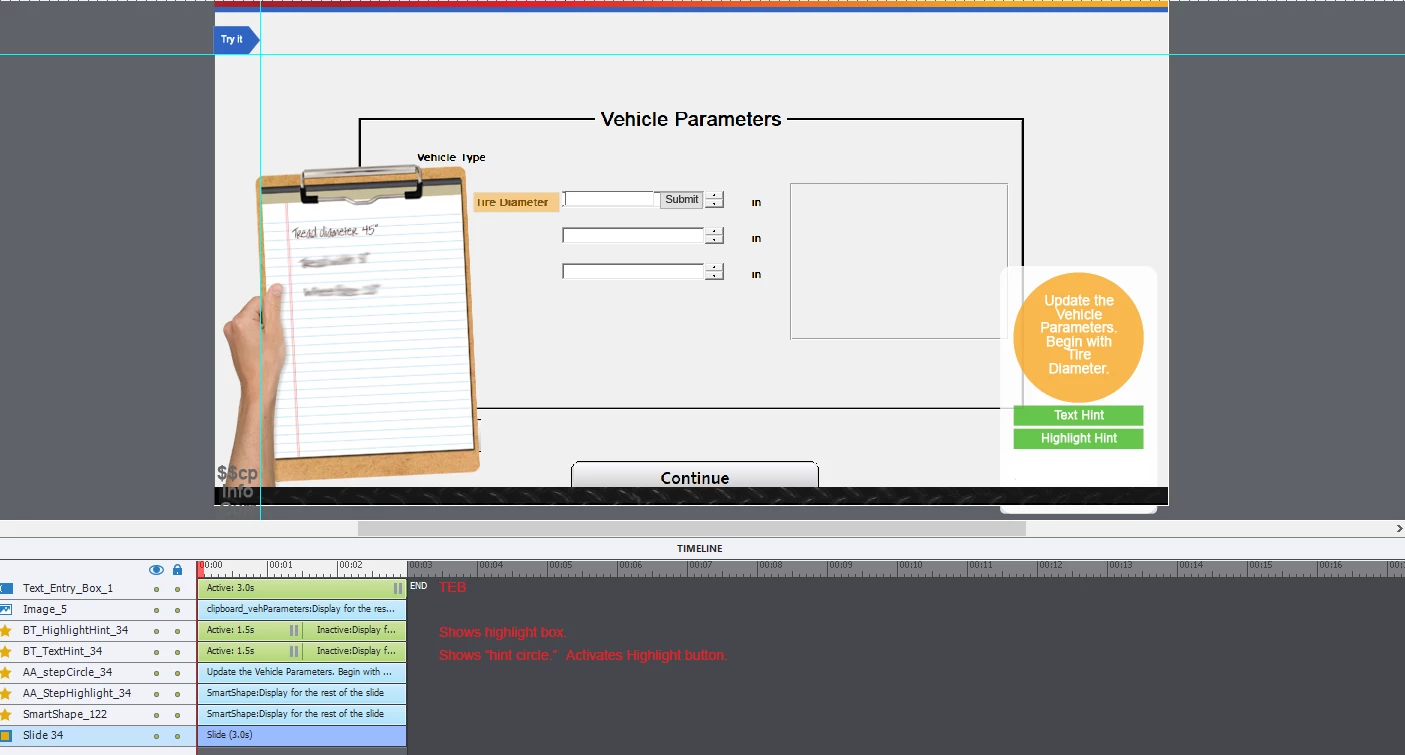
I'm working on a software simulation that offers two levels of hints (the green shapes in the lower right). On several slides, as illustrated in the screenshot, there is also a text-entry box. Here are the intended actions of the slide:
- If the Text Hint box is clicked, it will activate the Highlight Hint and show the text in the yellow circle. If the Highlight Hint is clicked, the yellow highlight box shows (it's just right of the clipboard here).
- The user will fill-in the Tire Diameter "field" with the number shown on the clipboard and click Submit. On a correct entry, the next slide is shown.
In practice, if the user goes directly to the TEB, fills in the number, and clicks Submit, everything is fine. However, if the user clicks one or both of the Hint buttons before filling in the TEB, the TEB will no longer accept any entry, and the slide is effectively stuck.
I suspect the locations of the pauses are the issue, but don't quite have the know-how to fix them. Any insights on this one?
Thank you in advance for any help you can provide!


 AdChoices