Known Participant
December 18, 2012
Question

Buttons trigger continue even when just Show/Hide (captivate 6 windows 7)

  • December 18, 2012
  • 1 reply
  • 1399 views

I have a simple image button that is designed to act as a close button for a modal popup window in Captivate (Constructed from a smart shape and a caption box).

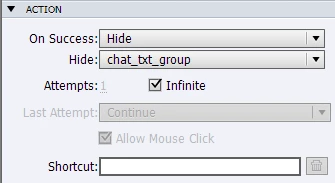
The button uses the "Hide" method to hide a target Group. This works fine, but I have noticed the button is also triggering the playhead to "Continue" also.

It seems that a button I have a "Show" action on also behaves this way. I don't want the playhead to continue, I just want to Show/Hide the objects on the slide. Is there a way to achieve this without haveing the playhead continue, resulting in going to a new slide?
Thanks in advance,

Sam

    This topic has been closed for replies.

    1 reply

    RodWard
    Community Expert
    Community Expert
    December 18, 2012

    You will find that you have more flexibility with what happens if you create an Advanced Action and set the actions in it to do what you want, then set the button to ON Success execute the Advanced Action.  If the AA is still causing the playhead to continue, just add another line in it that sets the system variable governing pausing to 1.  (Sorry I can't tell you its name because I'm typing this on an iPad.)

    Known Participant
    December 18, 2012

    Thanks Rod but this isn't going to work for me in terms of maintenance and flexibility. I will be using this method on several slides and will therefore have to maintain several advanced actions effectively doing the same thing as I believe a new "instance" of the objects is created on each slide and therefore I will have to reference the object by a new name for each slide, unless there is a more effecient way of achieving this, it isn't going to work.

    Thanks anyway.

    Cheers,

    Sam

    Lilybiri
    Legend
    December 18, 2012

    Sam,

    I'm not so sure this means more maintenance, because the advanced action needs only one statement and can easily be duplicated and edited. For simple actions you also have to select the action (Hide/Show) from the dropdown list, then choose the object using another dropdown list. If you count the number of clicks, this means about the same work. I have explained this important difference about releasing the play head between simple and advanced standard action in a blog post and a YouTube tutorial:

    http://lilybiri.posterous.com/why-choose-standard-over-simple-action

    http://www.youtube.com/watch?v=M3nKi-DB6Fw

    Perhaps you could even save time, but then I have to know if this 'group' of objects is different on each slide or the same? Or are some objects the same? A toggle button is also a possibility, in Captivate 6 you can have shape buttons timed for the rest of the project or on a master slide, which is not possible for the old image buttons.

    Lilybiri