


Participant
January 14, 2021
Answered

Buttons used as "Press to continue".

  • January 14, 2021
  • 3 replies
  • 587 views

I have an issue using buttons as "Press to continue" buttons. When I preview my completed project the button works fine (Whole surface area of button works as intended), however when I convert the project to scorm and upload to my LMS (TalentLMS) the button only functions as intended on the lower 25% of the button surface. Previewing the project in the scorm cloud has the same effect on the button, this suggests that my issue is adobe captivate related.

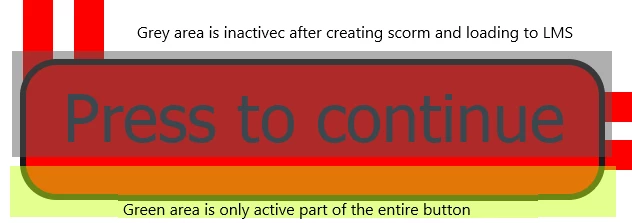


Any solutions to this issue will be greatly appreciated.


    This topic has been closed for replies.
    Correct answer RodWard

    Try going into your Project > Skin Editor settings and check your Border settings.  If borders are turned on, turn them OFF and republish to check whether that solves the issue.


    3 replies

    TLCMediaDesign
    Inspiring
    January 14, 2021

    Looks to me like the SmartShape is covering your button, the gray area directly coincides with the SmartShape. Is your button on top?

    Lilybiri
    Legend
    January 14, 2021

    Which exact version are you using? You can find the full version number under Help, About Captivate.

    Is this a Shape button or a Transparent button?

    RodWard
    Community Expert
    RodWardCommunity ExpertCorrect answer
    Community Expert
    January 14, 2021

    Try going into your Project > Skin Editor settings and check your Border settings.  If borders are turned on, turn them OFF and republish to check whether that solves the issue.


    Participant
    January 18, 2021

    Dear Rod


    Thank you so much, your fix did the trick. I'm a youtube Captivate user and if it wasn't for guys like you then I would be lost, thanks again.