



randallr57184699
Inspiring
April 1, 2021
Question

Buttons work in preview but not in published video

  • April 1, 2021
  • 1 reply
  • 899 views

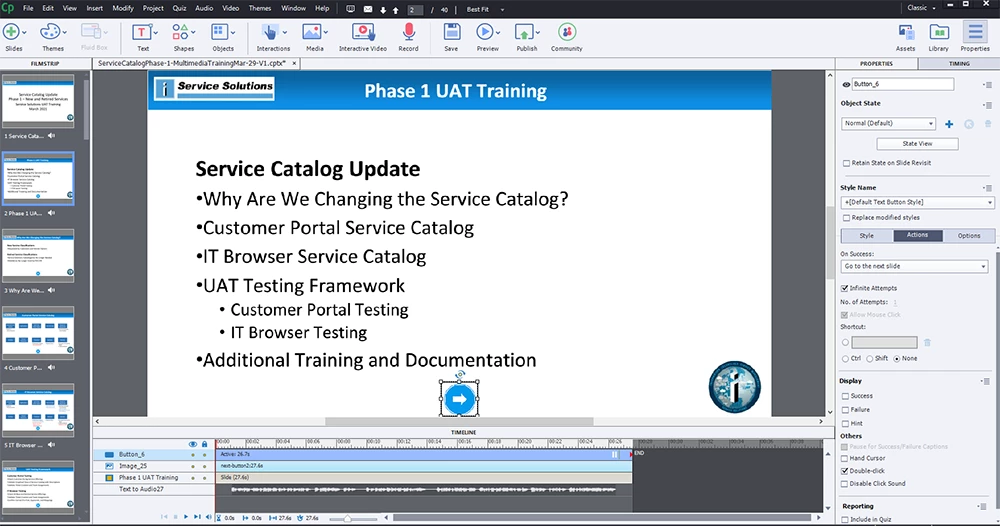
I have a slide based Captivate 2019 file. I have created stop and proceed to next slide buttons on each slides in Captivate. They work great in Preview. BUT when I publish this as a video to my computer they don't work. The video just runs from start to finish.
    This topic has been closed for replies.

    1 reply

    Lilybiri
    Legend
    April 1, 2021

    If you mean that you publish to MP4, you get a passive video. All interactivity is lost.

    To keep interatvitiy, like those buttons, you need to publish to HTML5, and upload to a webserver.

    randallr57184699
    Inspiring
    April 1, 2021

    So that is basically a website. I need a video file for people to access for training. I want them to hit a button to advance after a skill is demonstrated. Is the no way to do this?


    RodWard
    Community Expert
    Community Expert
    April 2, 2021

    There are several ways to do what you want, but first we need to know how you are intending to deliver this content to your audience.


    Will the content be delivered from a web server or LMS so that the audience views it in a web browser?

    Or, if you are publishing to MP4 video, did you decide to do this because you were NOT intending to deliver via the web?


    Video files are a lot heavier (in megabytes) than HTML5 output.  Captivate can do both, but you need to use each type for a reason.  So, what is your reason for using a single MP4 of the entire content?


    If we understand your design strategy we can offer better advice.