k8dc
Participant
January 30, 2018
Answered

C9 quiz question forward movement/control answer HELP

  • January 30, 2018
  • 1 reply
  • 565 views

I'd like help with a multi choice question in Captivate 9. When the learner clicks the Submit button, I want my own correct/wrong popup box to display, and then have the learner control the advance to the next screen. What's happening now is you have to click Submit twice for the responce box to display and then the slide auto forwards. Is there a way to set up what I want?

This topic has been closed for replies.
Correct answer Lilybiri

I have explained the necessary tweaking to quiz slide design in a rather old post but the principle is still valid:

Question Question Slides in Captivate - Captivate blog

The quiz slide is pausing at 1,5secs, I see that you didn't change that pause, why do you have such a long duration for that slide?

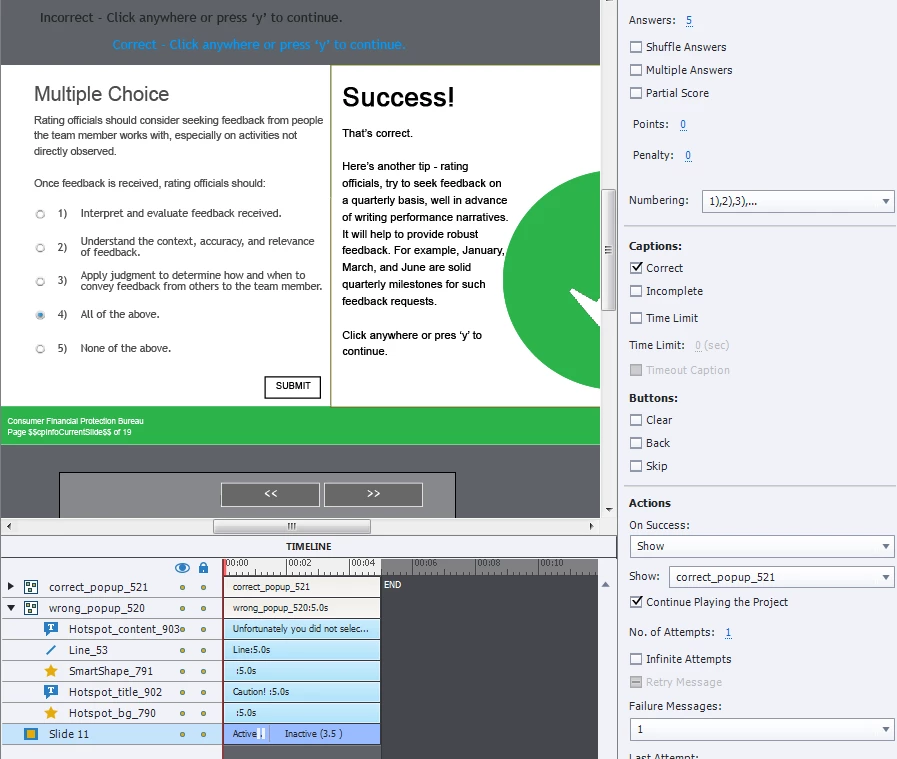
The normal design has a two-step Submit process: first the default shapes or captions appear as feedback, then (if it is the last attempt) the user needs a second action: to click on the slide or press Y. Only at that moment the playhead is released and the actions defined as Success/Last Attempt will be executed.

I see that you still have the 'correct' message checked off. That means that you still have two steps in the process. You have to uncheck that one as well to get rid of the first step of the Submit process. Then you'll be able to use the actions (Success/Last Attempt) to show the custom feedback group. But at that moment the playhead is releassed, which means you'll have to use another pausing point to prevent that the playhead continues through the intactive part of the quiz slide and proceed to the next slide. You can put a Next shape button (other interactive objects are not possible) with a timeline that starts 0,1sec after the present pausing point, and give it another pausing point later on. That shape button will then execute the action 'Go to Next Slide' which is the default choice for any simple action.

1 reply

Lilybiri
LilybiriCorrect answer
Legend
January 30, 2018

I have explained the necessary tweaking to quiz slide design in a rather old post but the principle is still valid:

Question Question Slides in Captivate - Captivate blog

The quiz slide is pausing at 1,5secs, I see that you didn't change that pause, why do you have such a long duration for that slide?

The normal design has a two-step Submit process: first the default shapes or captions appear as feedback, then (if it is the last attempt) the user needs a second action: to click on the slide or press Y. Only at that moment the playhead is released and the actions defined as Success/Last Attempt will be executed.

I see that you still have the 'correct' message checked off. That means that you still have two steps in the process. You have to uncheck that one as well to get rid of the first step of the Submit process. Then you'll be able to use the actions (Success/Last Attempt) to show the custom feedback group. But at that moment the playhead is releassed, which means you'll have to use another pausing point to prevent that the playhead continues through the intactive part of the quiz slide and proceed to the next slide. You can put a Next shape button (other interactive objects are not possible) with a timeline that starts 0,1sec after the present pausing point, and give it another pausing point later on. That shape button will then execute the action 'Go to Next Slide' which is the default choice for any simple action.
k8dc
k8dcAuthor
Participant
January 31, 2018

Shortened slide, unchked 'correct', and added the Next shape. I didn't know about the Next shape button (thank you!).

Additional question - when the learner answers and moves to the next screen, if the learner goes back to the quiz question the answer doesn't show. Is there a way for the wrong/correct answer to always show once the question is answered?

Lilybiri
Legend
January 31, 2018

No, that is showing only during Preview.