Known Participant
January 10, 2017
Answered

C9 won't publish even though I've published this project many times before

  • January 10, 2017
  • 2 replies
  • 584 views

I’ve never had any trouble publishing as HTML5/SWF to a zip file or to a folder – until last week. Now I can’t publish to either. If I choose publish to zip file, it publishes to the chosen folder but when I play the .swf file, I can click the Auto play arrow (the picture is there) and then I get an error message saying “Connection Failure” that quickly changes to “Loading” – and it never does.  If I choose publish to a folder, I get a “Publish failed” error.
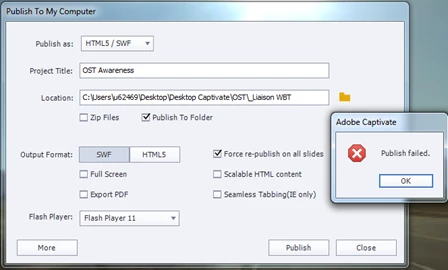
If I don’t check either option but just publish to a specific folder in the Location box (when normally I would click the “Publish to Folder” option), it will publish, open, and play on my computer just fine. But when I put this folder on a DVD and try to play it, I can click the Auto play arrow (like above), I get the error message saying “Connection Failure” that quickly changes to “Loading”. 

I’ve published this project many times – but now it will only publish successfully to an executable. I need to provide my customer with a playable version of this project.

Suggestions PLEASE!!!

SMILES,

Susann

This topic has been closed for replies.
Correct answer Lilybiri

Can you try to publish to HTML5, instead of SWF? The SWF button is greyed, which means that it is active, the HTML button is not active.

Try clearing the cache, while the project is open so that you don't lose the cache for that project (can be a last resource as a backup file).

2 replies

Inspiring
January 10, 2017

Susan, create a new folder on your desktop called 'test' and see if you can publish to that. It could be something to do with the folder name starting with an underscore you are trying to publish to. Are you on an organisations machine? I had similar where they had limited my roaming profile to 50MB which meant I wasn't able to publish anything larger than this to my desktop - also do you have permissions to publish to the folder you are trying to publish to?

Lee

Lilybiri
Legend
January 10, 2017

I'm confused. If you want to publish to an executable, why do you choose SWF only?

Open the first dropdown list and choose the option Executable

If you publish to SWF, you have to upload everything (included called documents) and launch the htm file with the same name as the SWF file, not launch the SWF file directly. The xxxx.htm file needs to call the CSS and JS files to offer the full functionality of your course.

Known Participant
January 10, 2017

Lilybiri, I want to do both. Some computers don't accept executables.

Lee, I have published to another folder. I am on my organization's machine. And I've published much larger files often. I do have permissions to publish to this folder.

The problem is that I've published this file to HTML5/SWF as recently as last month. Now, it's not publishing as it did previously and is functioning as I described.    I'm concerned that when I need to publish utilizing SCORM (soon), it won't publish successfully.

Lilybiri
LilybiriCorrect answer
Legend
January 10, 2017

Can you try to publish to HTML5, instead of SWF? The SWF button is greyed, which means that it is active, the HTML button is not active.

Try clearing the cache, while the project is open so that you don't lose the cache for that project (can be a last resource as a backup file).