
kellies50617532
Inspiring
January 22, 2019
Answered

Calculate Multiple Times

  • January 22, 2019
  • 11 replies
  • 784 views

Hi All,

I've made an Advance Action that lets the user enter a variable and then calculate it. It works and my conditional statements work as well. The issue is that Advance Action only works once. I want it to be able to work multiple times on just the one slide visit. I have it set for Infinite Attempts in the properties panel. So, idk what is going wrong.

Can anyone help?
This topic is closed to new replies. Start a new post to keep the conversation going.
Correct answer TLCMediaDesign

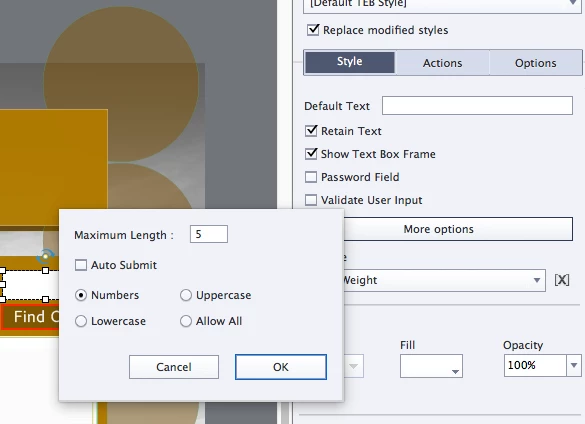
Wasn't sure if you needed to see the More Options sections or not.


Create your own button and apply the advance action to it. Deselect Show Button for the TEB

11 replies

Inspiring
January 22, 2019

Some more information would be helpful:

Is the value being entered in a text entry box (TEB)?

How is the AA triggered?

Please include a screenshot of the AA so we can take a look.

Lilybiri
Legend
January 22, 2019

Really need more details. Infinite Attempts for what? Which event is triggering the advanced action? Can I see a screenshot of the advanced action (use the Preview  button please)? Which version are you using?

kellies50617532
Inspiring
January 22, 2019

Captivate 9

Clicking the "Find Out" button causes the Advanced Action to Execute.

Lilybiri
Legend
January 22, 2019

Which version of 9, there have been 3 versions. Verify that you are using 9.0.2.

Apparently you don't know the Preview button: it is the first button in the top right control panel, looks like an arrow. It allows you to see the complete conditional advanced action, instead of those partial screenshots which are very tough to see the whole pciture.

This is  a Text Entry Box, is it validated or not?  Check in the Style tab.

How do you reset the TEB? If htat is what you want to do, getting back to the active part of the TEB is not possible anymore  by micronavigation(used to be in older versions)?. Once the TEB has gotten a value (which is probably stored in the user variable PalletWeight) you are in the inactive paert of its timeline, you need to reset it. Unless it is validated.