
Participant
November 22, 2010
Question

calling my SCORM files remotely through AICC

  • November 22, 2010
  • 3 replies
  • 2693 views

Hello,

I am trying to call my swf file and SCORM files through the 4 files created by Captivate using AICC in the publishing settings.
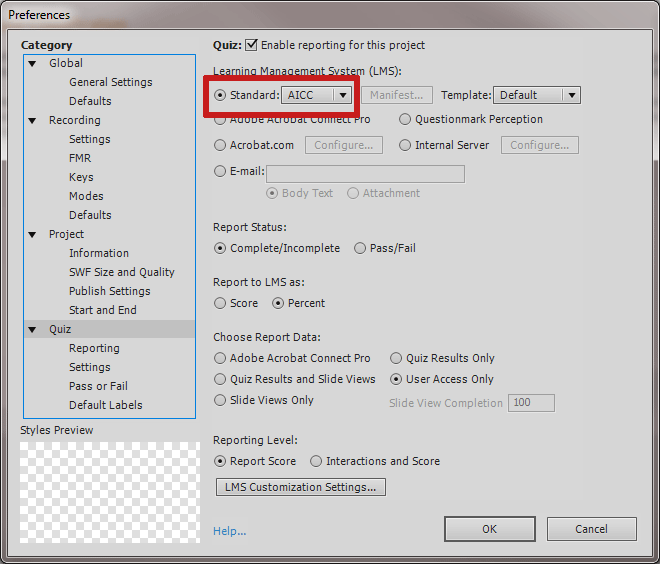
These 4 files that are created with the AICC method are:

  • captivate.au
  • captivate.crs
  • captivate.cst
  • captivate.des

I am told by the LMS vendor we use (Cornerstone On Demand) that these are the only files that we can put on their end in regards to using an AICC method to call our files remotely.

Now, if I put all my SCORM files, zip files, etc. on our media server how can I call those files remotely from their LMS server with just the 4 files mentioned above? I don't see how this is possible.

Any help would be greatly appreciated.

-Brad

*I should mention they will have a cross-domain-policy.xml with our server ip in place on their end to alleviate any Flash security issues.

This topic has been closed for replies.

3 replies

March 6, 2012

I'm sure you have figured this out by now, but I'm able to launch the course by doing the following:

1) changing the file path in the captivate.au file to the full address

2) Repackage the files to incluse only 4 files in the zip that you upload to Cornerstone: captivate.au, captivate.crs, captivate.cst and captivate.des

Now where I'm stuck: the course is not marked as "Complete". It showing as "In progress" in Cornerstone...

Did you have the same problem?

Thank you,

Olga

Brad2208Author
Participant
November 22, 2010

One other thing...so for AICC files it states when uploading to an LMS...

"An AICC package needs to be zipped up with the 4 AICC descriptor files (AU, CRS, CST, & DES)."

The thing is...when I publish my Captivate file in AICC format and choose zip.  It zips everything (probably like it's supposed to). However, I would like the swf to be called from my media server.  That way if I change it, I can do that with out rezipping everything and uploading everything in a package again.

Surely somebody else has done this.  It doesn't sound that weird to me to have your large files called from your own server where you have control of them for updates etc.  rather than leave them on somebody else's LMS.

-Brad

November 22, 2010

Hey Brad,

Wow that's sounds extra complicated.

It's pretty backwards to use AICC to call SCORM files. Why not just republish as an AICC file?

Or why not just put the file up to your server as a SCORM file? Why would you want to try to mix the two together? I have never heard of anyone doing this, and it sounds like a bad idea.

Brad2208Author
Participant
November 22, 2010

Graham,

I appreciate your time to try and help me on this.  I hear what your saying.  Maybe it's because of being new to all of this. I just need little to no files on my vendors LMS server (so we can save money with bandwidth that's why we are going the AICC route).   So if I can call everything through a working wrapper then that would be great.  However, when I tried to call my swf file remotely it did not work.  I would think this would be easy.  Am I missing something here?  As you can see from the code below (that was churned out through Captivate's AICC publishing settings) the swf file is being called locally.  When I replaced the swf with an absolute path to my swf file it did not work.  Yet the absolute path works in a browser.

Working absolute path: http://65.160.233.149/OnlineTraining/Series-I-Hiring-Paying/classification/classification.swf

<!-- Copyright [2008] Adobe Systems Incorporated.  All rights reserved -->
<!-- saved from url=(0013)about:internet -->
<!DOCTYPE HTML PUBLIC "-//W3C//DTD HTML 4.01 Transitional//EN" "http://www.w3.org/TR/html4/loose.dtd">
<html xmlns="http://www.w3.org/1999/xhtml" xml:lang="en" lang="en">
     <head>
          <meta http-equiv="Content-Type" content="text/html; charset=utf-8" />
          <title></title>
          <script src="standard.js" type="text/javascript"></script>
          <script type="text/javascript" language="JavaScript">
               var strURLFile = "classification.swf";               // Name of the flash file
               var strExitFile = "exit.swf";               // Name of the flash file that can facilitate LMS termination
               var strExitMessage = "Please remember to click the Exit button in the content, before closing the browser window.  Press \"OK\" to continue."
               var isMSIE = navigator.appName.indexOf("Microsoft") != -1;
               var g_bFinishDone = "";
               var AICC_URL="";
               var AICC_SID="";
               var strURLBase = "";
               var strURLParams = "";
               var varWindow = findAICCwindow(window);
               var strURLFull = varWindow.document.location.toString();
               var intTemp = strURLFull.indexOf("#");
               if (intTemp == -1)
                    intTemp = strURLFull.indexOf("?");
               if (intTemp > 0)
                    strURLParams = strURLFull.substring(intTemp + 1, strURLFull.length);
               var strTemp = location.protocol.toUpperCase();
               if (strTemp.indexOf("FILE") == -1)
                 var intTemp = location.pathname.lastIndexOf("/");
               else if (isMSIE)
               {
                    var intTemp = location.pathname.lastIndexOf("\\");
                    if(intTemp == -1)
                    {
                         //Bug 1512110 IE7 delimiter is "/".
                         intTemp = location.pathname.lastIndexOf("/");
                    }
               }
               else
                 var intTemp = location.pathname.lastIndexOf("/");

               if (intTemp != -1)
                 strURLBase = location.protocol + "//" + location.host + location.pathname.substring(0, intTemp + 1);
               else
                 strURLBase = location.protocol + "//" + location.host + location.pathname;

               if (strTemp.indexOf("FILE") >= 0)
                 strURLBase  = strURLBase .replace(/\\/g,"/");


               strURLParams = (strURLParams==unescape(strURLParams)?escape(strURLParams):strURLParams);
               strURLParams = (strURLParams==""?"":"?") + strURLParams;

               if(strURLParams.length > 1 && strURLParams.charAt(0)=='?')
                    strTemp = strURLParams.substr(1);
               var aryTemp = strTemp.split("&");
               for(var intTemp=0;intTemp < aryTemp.length; intTemp++)
               {
                    var strPair = aryTemp[intTemp].split("=");
                    if(strPair.length==2)
                    {
                         var strName=strPair[0].toUpperCase();
                         if(strName=='AICC_SID')
                              AICC_SID=strPair[1];
                         else if (strName=='AICC_URL')
                              AICC_URL=strPair[1];
                    }
               }


               function findAICCwindow(win)
               {
                    // This is a simple mechanism to walk up a frameset tree to find the window with AICC parameters.  This
                    // function should be modified, if the parameters are in a more complicated structure.
                    if(win.document.location.toString().toUpperCase().indexOf("AICC_URL") == -1)
                    {
                         if(win!=window.top)
                         {
                              win = (findAICCwindow(win.parent));
                         }
                    }
                    return win;
               }


               function setFinished(finished_bln)
               {
                    g_bFinishDone = finished_bln;
               }

               function Finish()
               {
                    // ExitAU
                    if(g_bFinishDone == false)
                    {
                         g_bFinishDone = true;
                         if (AICC_URL !="")
                         {
                              if (isMSIE)
                              {
                                   window.frames[0].document.forms[0].submit();
                                   var ms = (new Date()).getTime();
                                   while ((new Date()).getTime()-ms < 1000)
                                   window.status="posting to LMS...";
                              } else {
                             var w = varWindow.open("","mm_exitAU","top=4000,left=4000,scrollbars=no,directories=no,height=1,width=1,status=no,toolbar=no,menubar=no,location=no");
                             if (w==null)
                             {
                                   document.write('<table border="0" cellpadding="7" cellspacing="7"> \n');
                                   document.write('  <tr>  \n');
                                   document.write('    <td align="middle">');
                                   writedocument('<object classid="clsid:d27cdb6e-ae6d-11cf-96b8-444553540000" codebase="http://fpdownload.macromedia.com/pub/shockwave/cabs/flash/swflash.cab#version=10,0,0,0" width="1" height="1" align="middle"> \n'+
                                             '        <param name=movie value="' + strURLBase + strExitFile + strURLParams + '">\n'+
                                             '        <param name=quality value=high> \n'+
                                             '        <param name=menu value=false> \n'+
                                             '        <param name=loop value=0> \n'+
                                             '        <embed src="' + strURLBase + strExitFile + strURLParams + '" pluginspage="https://www.macromedia.com/shockwave/download/download.cgi?P1_Prod_Version=ShockwaveFlash" quality=high type="application/x-shockwave-flash" name="Captivate" width="1" height="1" align="middle" swLiveConnect="true">\n'+
                                             '        </embed>  \n'+
                                             '      </object>');
                                   document.write('</td> \n');
                                   document.write('  </tr> \n');
                                   document.write('</table> \n');
                                   alert(strExitMessage);
                             } else {
                                   w.document.write("<html><head>"+"<script"+">function findAICCwindow(win){if(win.document.location.toString().toUpperCase().indexOf('AICC_URL') == -1)     {if(win!=window.top){win = (findAICCwindow(win.parent));}}return win;}function exitAU() {var varWindow=findAICCwindow(window);window.document.forms[0].submit();varWindow.close();}</"+"script>"+
                                                   "</head>"+
                                                        "<body>"+
                                                             "<form action='"+unescape(AICC_URL)+"' method='post'>"+
                                                                 "<input type='hidden' name='session_id' value='"+unescape(AICC_SID)+"'>"+
                                                                 "<input type='hidden' name='version' value='3.5'>"+
                                                                 "<input type='hidden' name='command' value='ExitAU'>"+
                                                                 "</form>"+
                                                             "</body>"+
                                                        "</html>");
                                   w.exitAU();
                             }
               }
                         }
                    }
               }
               function isrc()
               {
                    return '<HTML><head><script><'+'/script></head><body MARGINWIDTH="0" MARGINHEIGHT="0" LEFTMARGIN="0" RIGHTMARGIN="0" TOPMARGIN="0" BOTTOMMARGIN="0">'+
                            "<form action='"+unescape(AICC_URL)+"' method='post' name='brz' ><input type='hidden' name='session_id' value='"+unescape(AICC_SID)+"'/><input type='hidden' name='version' value='3.5'/><input type='hidden' name='command' value='ExitAU'/></form>"+
                            "</body></html>";
               }
               if (isMSIE) {
                    document.write('<iframe name="iframe" width="0" height="0" src="javascript:parent.isrc()"></iframe>');
               }

          </script>
     </head>
     <body  bgcolor="#06295d" onunload="Finish();">
             <center>
          <div id="CaptivateContent"> 
          </div>
          <script type="text/javascript" language="JavaScript" name="cmifrag">
               document.write('<center>');
               document.write('<table border="0" cellpadding="7" cellspacing="7"> \n');
               document.write('  <tr>  \n');
               document.write('    <td align="middle">');
          
               var so = new SWFObject(strURLBase + strURLFile + strURLParams, "Captivate", "903", "567", "10", "#CCCCCC");
                    so.addParam("quality", "high");
                    so.addParam("name", "Captivate");
                    so.addParam("id", "Captivate");
                    so.addParam("wmode", "window");
                    so.addParam("bgcolor","#06295d");
                    so.addParam("menu", "false");
                    so.addVariable("variable1", "value1");
                    so.setAttribute("redirectUrl", "http://www.adobe.com/shockwave/download/download.cgi?P1_Prod_Version=ShockwaveFlash");
                    so.write("CaptivateContent");
               document.write('</td> \n');
               document.write('  </tr> \n');
               document.write('</table> \n');
               document.write('</center>');
          </script>

          <script type="text/javascript">
               document.getElementById('Captivate').focus();
               document.Captivate.focus();
          </script>

          </center>
     </body>
</html>

November 22, 2010

Ah I see. I've tried to do the exact same thing, with no success. Going through and replacing the

called swf sticks me at the Loading... Loading... screen.

I spent a ton of time searching the internet and couldn't find any individuals who could do it

successfully. The people over at scorm.com have basically created a plugin to Amazons Cloud that

allows them to do just that, but I doubt they are willing to share that piece of tech.

Sadly, there are just a ton of problems with trying to get cross-domain AICC or cross-domain SCORM to

work, and I had to improvise, adapt, and overcome with some off the wall solutions to get quizzing and

reporting done and still use a cloud service.

If you had some skilled programmers on your team I'm sure they could figure it out with enough time,

but that is beyond my knowledge / skill base.

Graham