
Participant
March 3, 2016
Question

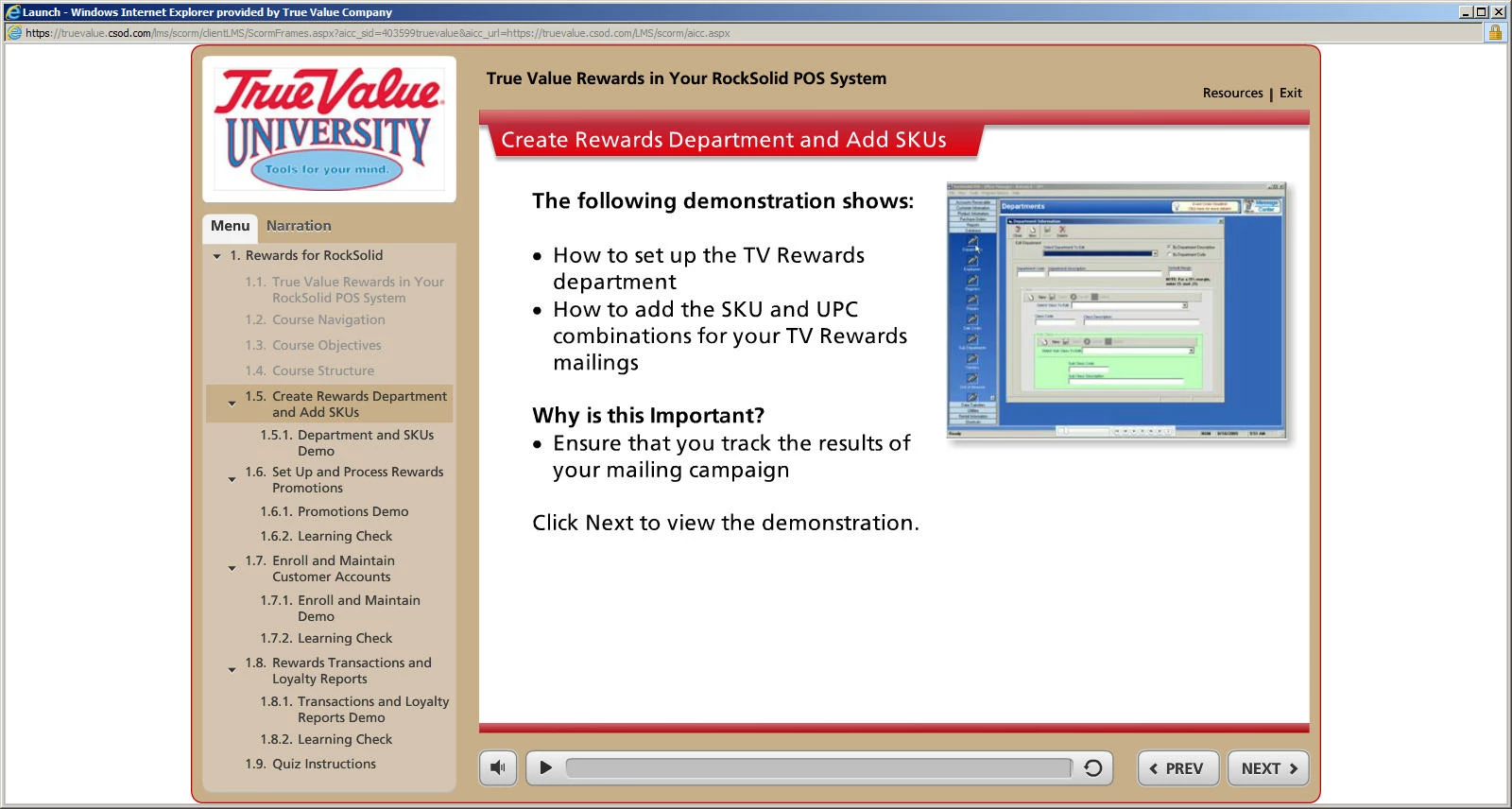
Can I adjust the TOC photo size to be larger?

  • March 3, 2016
  • 1 reply
  • 183 views

I can add a photo to my TOC, however it is very small. Is there a way to control the size of the photo so it is larger? I am trying to copy a TOC/Skin that was created by someone else in Storyline which offered a large photo at the top of the TOC. Image example below...

Storyline example...
This topic has been closed for replies.

1 reply

RodWard
Community Expert
Community Expert
March 4, 2016

Unfortunately Captivate doesn't offer the option to have the image in the TOC take up the whole width of the TOC.  I've encountered the same issue this week where a client's logo is about three times wider than it is high.  I built a set of courses for the same client last year in Storyline but this time they wanted it in Captivate instead...with the same look and feel.

There's no way I have found to make the logo look any good in the TOC and I've given up.  If the output was HTML5 there might be a way to hack the output code.  But since the output in this case is SWF, the only solution would be to build a special widget or customized skin and I'm not THAT worried about it.  The client's logo can go elsewhere in the content.

dsahloffAuthor
Participant
March 4, 2016

Thanks for your response!!