Known Participant
December 2, 2010
Answered

Can I change the font for True/False question?

  • December 2, 2010
  • 1 reply
  • 967 views

I'm using Captivate 5. I have a darker background so I want to use white font for all questions. I was able to change the words "True" and "False" but unable to change the letter "A" and "B" that next to the radio buttons. Can anyone help? Thanks!

    This topic has been closed for replies.
    Correct answer Lilybiri

    Hello,

    Here is an alternative to the solution proposed by Whyves if you want to have the same style for all the True/False questions.

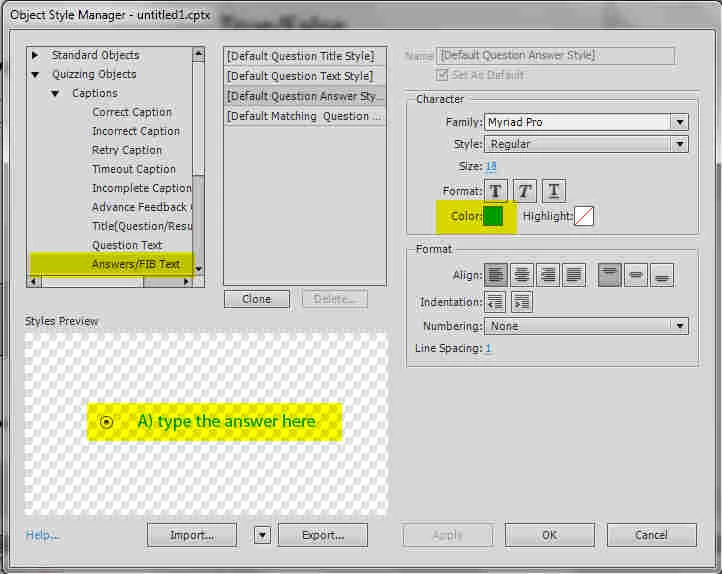
    Can you open the Object Style Manager (Preferences menu or SHIFT-F7)? Go to the Quizzing Objects, category Captions. Choose Answer/FIB Text and change the color and eventually other attributes. All your answers will now have the new color. If you do not want to override the original Default style for those captions, you can also clone the style, change the clone and apply that to this kind of captions.

    The workflow in CP5 is different from previous versions. Personally I think it a good practice to choose first of all the proper Object styles. If you do this before opening a project, the changed styles will be applied to all the project you create during that session.

    Lilybiri
    1 reply

    Inspiring
    December 4, 2010

    You just need to select the distractor text and then go to the properties tab. You will be able to change the font from there

    Whyves

    www.flash-factor.com

    99thanksAuthor
    Known Participant
    December 4, 2010

    When I highlight the whole thing, it only selects True/False. I'm unable to select the letter. Is there any other way of selecting it? See the picture below. thanks!

    Inspiring
    December 4, 2010

    If you get only the "True" part to change its color it's because, you have individually selected the word. In order to change the entire text, including A), make sure the text is not selected (click on another object to change focus) and then click once on the text to select it (don't double click!). Now, if you select a new color, the entire text will be of the selected color.

    Whyves

    www.flash-factor.com