Inspiring
February 16, 2017
Answered

Can I copy and past Master Slide into FilmStrip Slide?

  • February 16, 2017
  • 1 reply
  • 280 views

I am using Adobe Captivate 8 on a Windows 8 computer.

Can I copy and paste a Master Slide and paste it into a Filmstrip Slide? When I try to do it nothing happens. As a matter of fact, when I try to copy and paste anything from the Master Slide into my Film Strip slide nothing happens.

Am I going about it the wrong way? It is a matter of inserting or selecting the correct objects in the properties panel?

Thanks
This topic has been closed for replies.
Correct answer Lilybiri

No, Master slides can be copy/pasted in between projects but they have to be in the Master slide panel. Same for normal slides, they can only be copy/pasted or duplicated in the Filmstrip. Those are different 'beasts', you cannot put a bike wheel on a car....

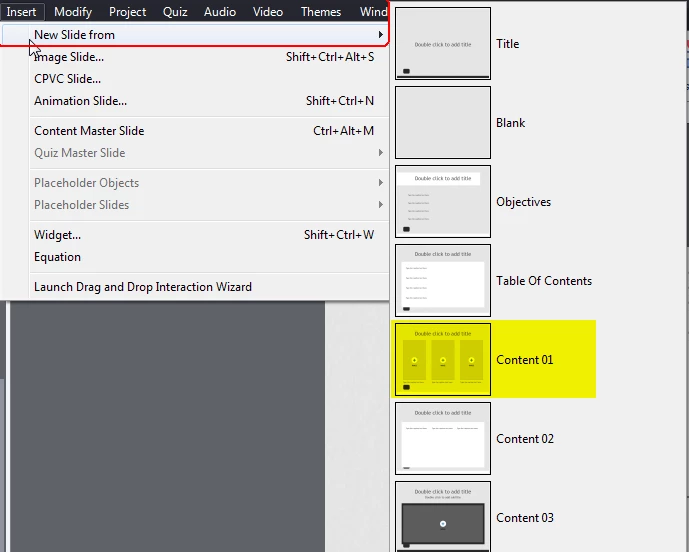
You should create a slide, based on the master slide, like using a drawing template (I'm an engineer) to draw a specific curve on paper.

Maybe read: What's in a Theme - a Template? - Captivate blog

1 reply

Lilybiri
LilybiriCorrect answer
Legend
February 16, 2017

No, Master slides can be copy/pasted in between projects but they have to be in the Master slide panel. Same for normal slides, they can only be copy/pasted or duplicated in the Filmstrip. Those are different 'beasts', you cannot put a bike wheel on a car....

You should create a slide, based on the master slide, like using a drawing template (I'm an engineer) to draw a specific curve on paper.

Maybe read: What's in a Theme - a Template? - Captivate blog