Known Participant
August 16, 2010
Answered

Can I pause my project when the user clicks?

  • August 16, 2010
  • 1 reply
  • 1166 views

Hello all,

I am working on a project using Cp4.

My project plays automatically without user interaction.

I need project to be paused when the user clicks on a clickbox at run time & it should play when the user again clicks the same clickbox.

I can pause the project by adding a clickbox and applying the property "pause the project until user clicks.

But it must be a user wish interaction whether to pause or play.

Is that possible ? How could I make my work done ?

Regards,

Kartik.P
    This topic has been closed for replies.
    Correct answer

    Hi Lilybiri

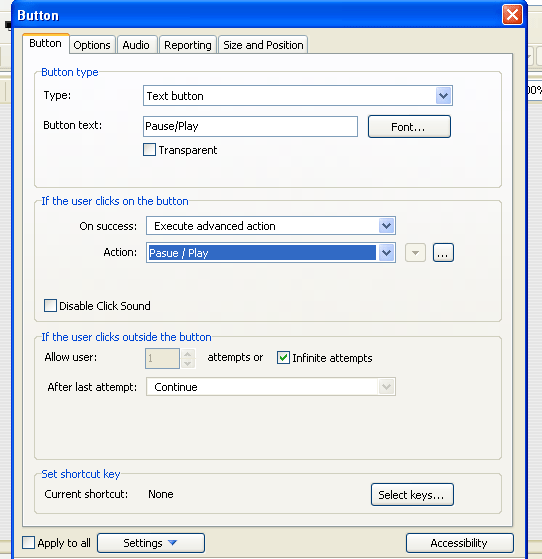
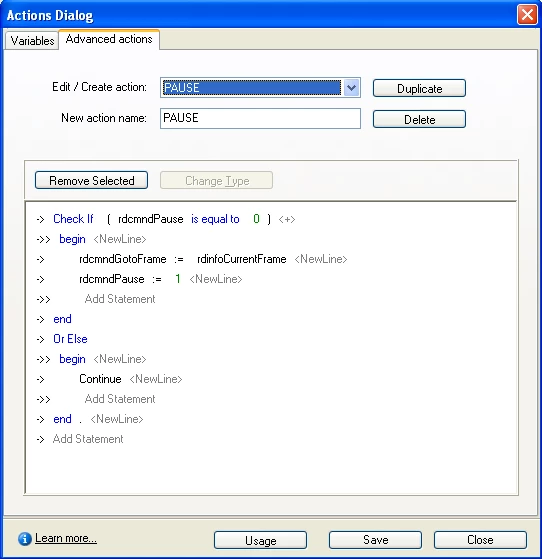
    I have applied the same settings. But could not get the result.

    I have to pause & play my project alternaively when user clicks.

    ________________________________________________________________________

    I have tried this way where I could pause my project but unable to play it. I dnt know if it is a correct process or not but what I need is the output.

    Pls dnt consider this one if it is a wrong procedure.

    Regards,

    Kartik.P


    Hi,

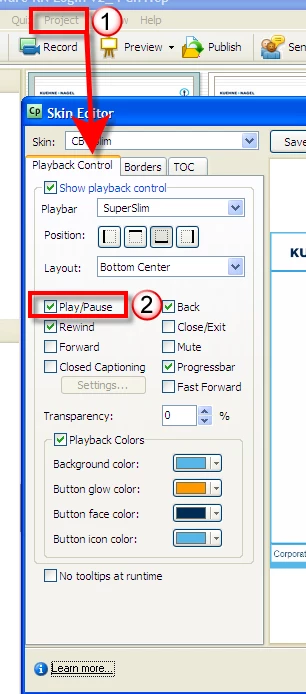
    Maybe I have missed the original request, but if you just want to give the user the option to stop/start your project at a time that suits them...have you considered the playback control options? This is a simple option that allows the user to pause/run the slide as they wish....

    1 reply

    Lilybiri
    Legend
    August 16, 2010

    Hello,

    Do I understand your question all right: you do want a button that toggles, if the SWF is playing the button has to pause the movie, if it is paused, the button has to release the pause and the movie plays on.

    OK then, create a very simple Advanced action (Project menu) where you do this Assign statement:

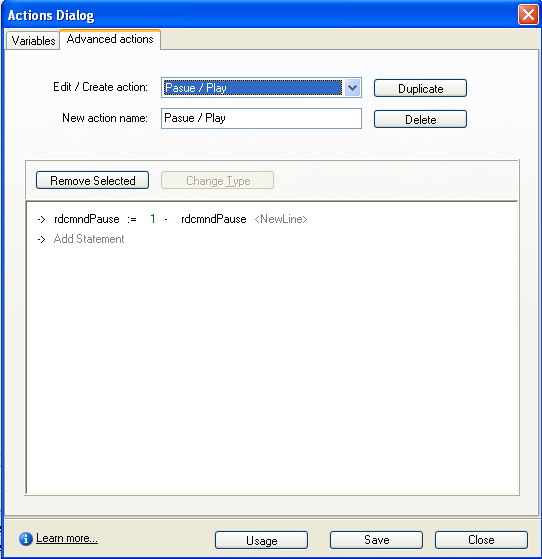
    rdcmndPause = 1 - rdcmndPause

    Some explanation: if this system variable = 1, the movie pauses, if it is = 0 the movie plays.

    Forgot to tell that you attach this Advanced action to the button as Success action (if user clicks on the button). Leave the number of attempts for clicking outside to infinite.

    Lilybiri

    Known Participant
    August 16, 2010

    Hi Lilybiri.


    Thanks for replying.

    I would try this and see whether I would get the result but I think it helps me.

    Even I am trying the same way using actions but I am not sure what to apply as I am working for the first time using Actions.

    Regards,

    Kartik.P

    Lilybiri
    Legend
    August 16, 2010

    Hello,

    I tried it out and it works all right. If you do not want a button, you can also replace this by a click box (that is invisible), perhaps covering up the whole slide and instruct the user just to click on the slide to pause or to 'un'-pause.

    As for the construction of the Advanced action (do have a couple of tutorials, but they are for CP5):

    • Open the dialog box from Project Actions
    • Be sure to be on the tab Advanced Actions and choose Create a new action from the dropdown list
    • Name the action
    • Double click on the first statement, it has to become red
    • Use the spacebar to open a list, and choose Assignment
    • From the first dropdownlist choose Variable rdcmndPause
    • From the second list (after the =) choose Value
    • Type in 1 for the value
    • From the third list choose the minus sign
    • From the fourth, choose again Variable and from the list choose rdcmndPause
    • Save the action

    It is a bit clumsy, but the result should look like this:

    Lilybiri