

Daniel Albarran SA&A
Inspiring
January 14, 2022
Answered

Can´t download characters

  • January 14, 2022
  • 1 reply
  • 207 views

Hi everyone, I´m trying to download photo characters with no success, it gets stuck in this window:
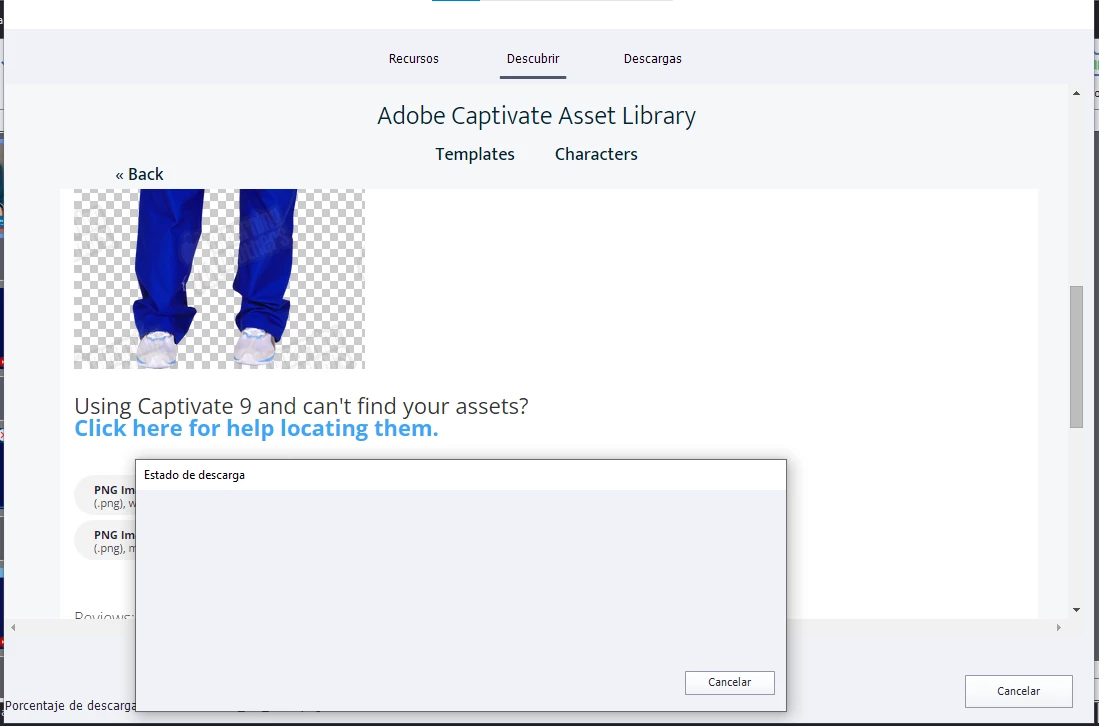
I´m using Captivate 2019, in a Windows 10 laptop. Any clue? 

Thank you.

Daniel

    This topic has been closed for replies.
    Correct answer Daniel Albarran SA&A

    It works now. I followed the instructions here:

    https://community.adobe.com/t5/captivate-discussions/issues-with-asset-panel-in-adobe-captivate-2019-release/td-p/11340288/page/2

    Especifically: "Unable to download characters from the Asset Panel"

    Note: I also had tried the first set of instructions ("Asset Panel is blank") and it hadn´t worked. Now I realize that my problem was "Unable to download characters from the Asset Panel".

    Daniel

    1 reply

    Daniel Albarran SA&A
    Daniel Albarran SA&AAuthorCorrect answer
    Inspiring
    January 14, 2022

    It works now. I followed the instructions here:

    https://community.adobe.com/t5/captivate-discussions/issues-with-asset-panel-in-adobe-captivate-2019-release/td-p/11340288/page/2

    Especifically: "Unable to download characters from the Asset Panel"

    Note: I also had tried the first set of instructions ("Asset Panel is blank") and it hadn´t worked. Now I realize that my problem was "Unable to download characters from the Asset Panel".

    Daniel