


Participating Frequently
February 8, 2021
Question

Can't enter into Captivate Software

  • February 8, 2021
  • 2 replies
  • 636 views

Good morning,


I'm using captivate software, but now I can't enter. It appears a message saying that I have to download "application manager". I bought the software, so I don't know what happens. Where can I download "application manager".
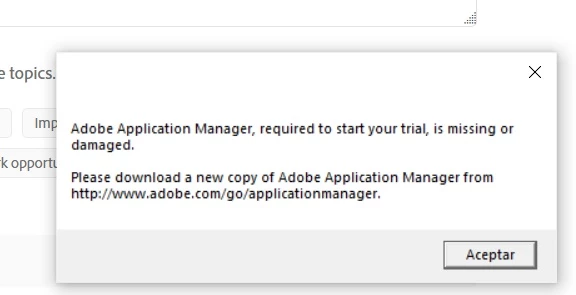


Thank you very much for yout attention and help

    This topic has been closed for replies.

    2 replies

    Lilybiri
    Legend
    February 8, 2021

    Hmm... not completely sure but I think this is referring to the Creative Cloude manager (why is terminology always so confusing and changing)? This is necessary for Captivate because you can use Adobe fonts in Captivate. For that reason you need that manager and log in to it with the same Adobe ID as you use in Captivate.

    Aitor5E28Author
    Participating Frequently
    February 8, 2021

    Thank you very much for your answer. It appears when I click in to the adobe captivate application from my destock (Computer) yiu can see the image). I' m working with captivate more than a month.


    RodWard
    Community Expert
    Community Expert
    February 9, 2021

    Hi Aitor,

    Could you please check your system to see if you have the Adobe Creative Cloud Manager app installed.  If that app is not installed, this could be the reason Captivate is not happy.  It should have been installed along with Captivate.  


    Captivate is not actually part of the Adobe Creative Cloud family of apps but it does use some Adobe technology that is part of the Creative Cloud platform.   For example, Captivate needs the Adobe Media Encoder (which I see you already have.)


    If Creative Cloud manager was somehow missing from the Spanish version of Captivate that you installed, you may perhaps be able to get it to work by installing one of the free Creative Cloud applications.  Adobe Bridge would be the one I suggest you install.  That should then mean you have the Creative Cloud Manager app as well.

    RodWard
    Community Expert
    Community Expert
    February 8, 2021

    Which version of Captivate is it that you purchased? 

    The latest version is Captivate 2019.


    I haven't personally seen this particular error message when installing from one of the packages downloaded from the Adobe website.  Did you download the install files from Adobe or did you get them from somewhere else?  (E.g. a CD-ROM or other website.)

    Aitor5E28Author
    Participating Frequently
    February 8, 2021

    Yes, I bought the last version Adobe captivate 2019. I have working with adobe captivate more than one moth ago, and I haven't problems. But now, i can enter when I click in the application (see the image).


    I took adobe captivate from the official adobe captivate web site (downloading).


    If I unsinstall the software and I install again the software, the problem can disappear?.


    Tahnk you very much


    Aitor5E28Author
    Participating Frequently
    February 8, 2021

    I can't enter, sorry.