
Participant
July 19, 2018
Answered

Can't find an executable file after publishing a responsive project

  • July 19, 2018
  • 1 reply
  • 315 views

I created a responsive project and published it as HTML5 (my only option) to my hard drive.  After publishing, a popup allows me to choose to view the output.  Everything looks great when I do so.  As soon as I close the file (or if I choose to publish and do not view the output), I cannot find an executable project file anywhere in all of the folders created when publishing the project.

I have tried zipping when publishing and not zipping.  I have the most recent updates after getting the same results from the previous one.  I chatted with Adobe Captivate with no answer other than to start over with on a non-responsive project.  When I asked where the executable was for the responsive file was, I was told it was a .index file. I do not have one of those.

I am a novice Captivate user and spent about 40 hours on this project.  I really don't want to start over.  Can someone please help me?

Thank you!
    This topic has been closed for replies.
    Correct answer Lilybiri

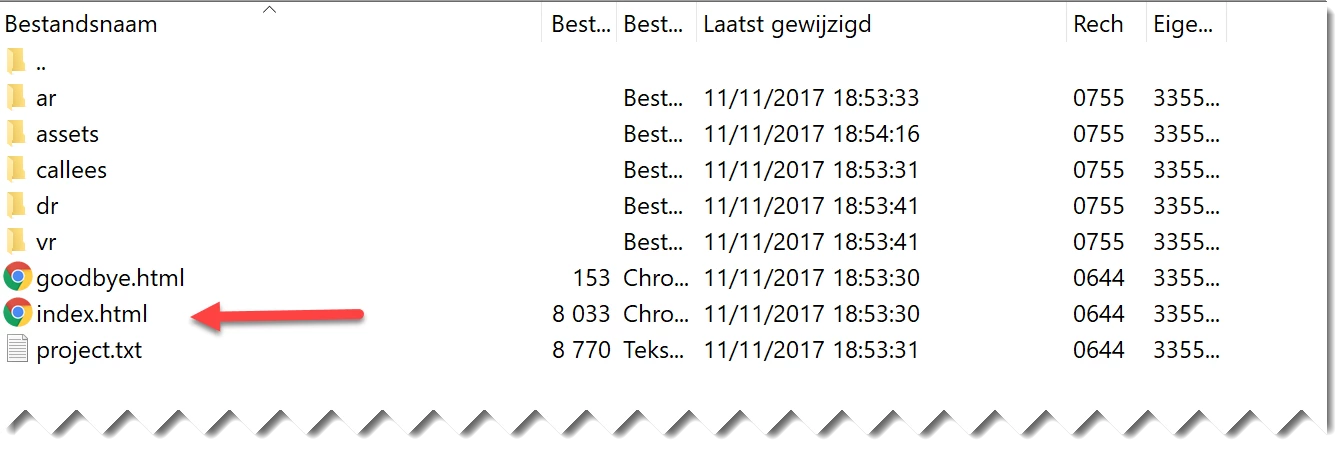
    Here is a screenshot of a responsive project with Fluid Boxes, after publishing:

    Can you post a screenshot of the folder you see after publishing?

    BTW: a responsive project has always the unique option to publish to HTML. Mobile devices do not support SWF output since years, and soon this will also be the case for desktopbrowsers.

    You didin't tell if you created a SCO, a project that is used to transfer data to a LMS? The simple project above was not a SCO. For a SCO you'll have to look for index_scorm.html. Moreover you'll have a lot more files.

    A published Captivate course is like a web site, it has to 'exe' file at all, but is launched from the index.html file (or the scorm equivalent).

    1 reply

    Lilybiri
    LilybiriCorrect answer
    Legend
    July 19, 2018

    Here is a screenshot of a responsive project with Fluid Boxes, after publishing:

    Can you post a screenshot of the folder you see after publishing?

    BTW: a responsive project has always the unique option to publish to HTML. Mobile devices do not support SWF output since years, and soon this will also be the case for desktopbrowsers.

    You didin't tell if you created a SCO, a project that is used to transfer data to a LMS? The simple project above was not a SCO. For a SCO you'll have to look for index_scorm.html. Moreover you'll have a lot more files.

    A published Captivate course is like a web site, it has to 'exe' file at all, but is launched from the index.html file (or the scorm equivalent).

    vonelynnAuthor
    Participant
    July 19, 2018

    Thank you for responding.  After updating Captivate, I published again and saw the same files.  I just tried to open the index.html and it worked.  Before updating, when I opened that file I got nothing but a blank page.

    Thank you again!

    Vone

    Lilybiri
    Legend
    July 19, 2018

    Please do not add personal credentials (I deleted them). This is a public forum, you don't want spam or stalkers I presume.