Can't match end of slide to end of object (gap)? [Captivate 6]
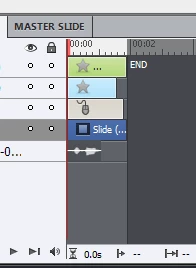
Lately I seem to be having an issue with making the end of the slide match the end of the last object on the slide. As you can see in the attached image, the longest item on the timeline is the mouse click. (Ignore the shape on the very top; this is a button that has the timing set to display for the rest of the slide. I have tried to set this to "specific time" and make it very short, but that did not affect the outcome of this problem.)
What I would like to do is to drag the slide length to the left and shorten it to match the shorter length of the mouse click. However, I am unable to make the slide duration any shorter.
I think this has to do with the audio I added. I have a longer audio track that I added to the slide, and then I edited it and shortened it. The reason I'm doing this is because I'm showing single steps, and the audio narration bunches together a bunch of steps at once. I'm thinking that maybe, even though the ausio is shortened, Captivate doesn't see this "gap," and won't let me shirten the clip because it still thinks there's audio there? Sometime I fiddle around, and chop some silence from the beginning and end of the audio clip, and it lets me drag it a bit further. But in some cases, like here, for example, I don't have any room for more editing. The audio clip is pretty small now, and I need that little bit of silence remaining. This problem throws my project off, because when you watch the whole thing in one go, it can create odd gaps, jumps, or silences. Even if they are tiny, it makes things seem "off."
Any idea how I can fix this?
 AdChoices