
ElGuitarMan0
Inspiring
June 10, 2013
Question

Can't open Captivate 6 project

  • June 10, 2013
  • 2 replies
  • 1114 views

I have a Captivate 6 project that when I try to open it, it get's to about 80% load and then the load box disappears and nothing opens. No error message. I have been developing the project on a network drive (I know.....not recommended).
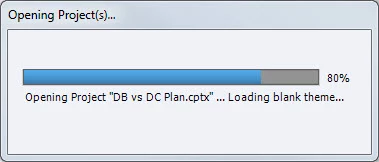
Here's what I've tried so far in terms of solutions that haven't worked:

1. Rename the backup file and try loading that file

2. Move the project file and backup file to the C: drive and try loading from there

3. Clear the cache

I was able to restore to a previous night's file and that file opens ok but I lose 1 day work. Any ideas as to why I can't open my project? Thanks!

    This topic has been closed for replies.

    2 replies

    RodWard
    Community Expert
    Community Expert
    June 11, 2013

    From the error dialog you showed, it looks like you may have had a corrupted theme preventing the loading.  Developing over a network drive (bad GuitarMan...naughty GuitarMan) might have caused this.  Please avoid in future and consider yourself lucky you only lost one day.

    Clearing your cache is not necessarily a good idea for this type of issue as your cache file might have provided you with another means of rescuing your content.

    ElGuitarMan0
    Inspiring
    June 11, 2013

    Thanks for your response Rod. Yes, I know, I'm a shameless developer who should have never done the lazy network route, but here I stand, begging for mercy from the e-learning Gods! 

    I now realize that clearing the cache is not the desired solution in this case but unfortunately I read that solution post after already committing the crime, so again, guilty I stand.

    I may be pooched in this situation, but I am going to move my project to the C: drive and begin manually backing up. I'm just surprised that the native Adobe backup file solution wasn't helpful in my case.

    Adobe Employee
    June 10, 2013

    Hi There,

    Welcome to Adobe Forums.

    Please let me know:

    1) What kind of changes have you made in the project from last night?

    2) Is Captivate installed on the C drive?

    3) Are you able to open other projects?

    4) Try to create a new test project in Captivate on the local drive and then see if you were able to open that?

    5) Which OS do you have?

    Thanks

    Vikas

    ElGuitarMan0
    Inspiring
    June 11, 2013

    Hi Vikas,

    To answer your questions:

    1) I was tweaking timing etc, so there were many little changes; too many to remember as I wasn't anticipating a problem.

    2) Yes, Captivate is installed on C: drive | Program Files

    3) Yes, I can open other projects

    4) I created a local C drive project and it opens just fine.

    5) Win 7

    Also, another developer on our team was not able to open the file from their computer either. Same issue. Thanks!