
Participant
June 16, 2020
Question

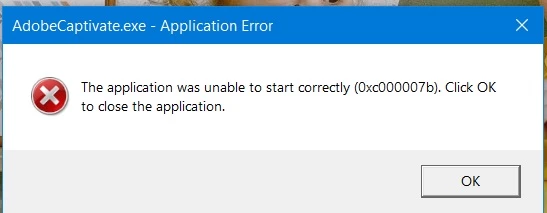
Can't open program Adobe Captivate

  • June 16, 2020
  • 1 reply
  • 272 views

Dear all,

Thank you for reading my topic.
Firstly, I'm so sorry if my English is not fluent. For my problem I try to open program adobe captivate but it can't, it has a notification like the picture that I attached. So I try to fix many methods from youtube or forums, but still can't open them. Please suggestion

Thank you.
    This topic has been closed for replies.

    1 reply

    Lilybiri
    Legend
    June 16, 2020

    Is Captivate installed on your system, not on a networked or external drive?  Are you in a company where your Documents are stored on a networked drive? That would mean that in Preferences, General setting both paths (Publish at and Cache) would point to networked drives, which has tp be avoided. You need to work with files stored on your system.

    Are you on the most recent version? You find the full version number under Help, About Captivate. Which OS do you use?

    SukitaAuthor
    Participant
    June 17, 2020

    Thank you for your suggestions.
    Captivate install in my system,  not stored on a networked drive. And I already update OS to full version but still  have an error.
    Thank you

    RodWard
    Community Expert
    Community Expert
    June 17, 2020

    You need to get in contact with Adobe Captivate Support.  This is just an unpaid user forum.  For a problem of this type it is usually necessary to have more technical help from the people that made the software.  Unfortunately, even when they see these types of issues on the forum, they don't usually respond to help.  So, you may need to use more direct means to contact them.