
Can't publish CP 9 project for iPad. Why is Publish button grayed out?
I'm trying to export a simple Captivate 9 project as an iPad app, but the Publish button in the Publish for Devices dialog is grayed out. Maybe someone can tell me what I'm doing wrong?
What I've done so far:
1. Created a project in Phone Gap called Delete1. That's also the name of my Captivate project.

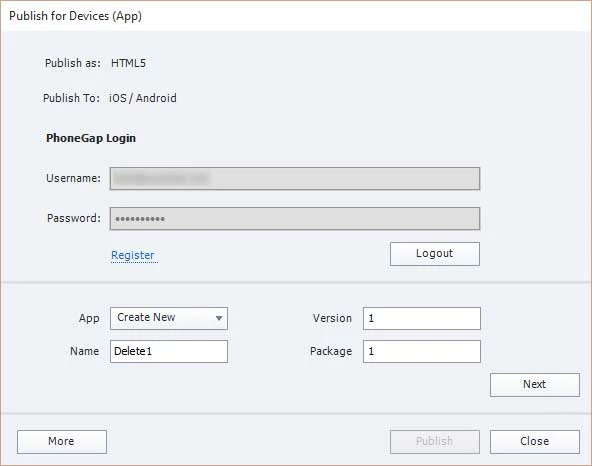
2. From the Captivate toolbar, chose Publish > Publish for Devices. Logged in to Phone Gap, chose to create a new app and gave it a name of Delete1. Clicked Next.
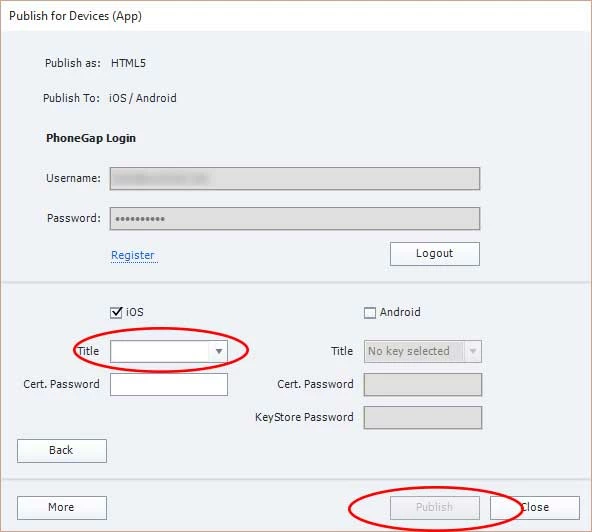
3. Chose to publish only as iOS, but can't type or choose anything in the Title combo box. This is where the Publish button is grayed out. I'm also confused about the Password field. Is this where I create a password or where I use one created elsewhere?
More generally: can someone recommend a tutorial on creating an app with CP 9? Easelsolutions has a very good tutorial on YouTube for CP 8, but there are significant differences in version 9.
 AdChoices