cathym25893232
Known Participant
March 13, 2017
Question

Can't record a clear video demo for the remote login tool

  • March 13, 2017
  • 1 reply
  • 559 views

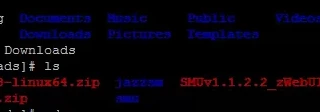
When I record a video demo using the remote login tool ---- putty. No matter what resolution I choose, I can't got the clear video. It seems the white characters are shown clearly while the red and blue ones are not.

The screenshot is attached below.

Does anybody know how to resolve this problem? I can get clear video if I choose the 'software simulation' mode instead of 'video demo', but here I have to use 'video demo' for my project.
    This topic has been closed for replies.

    1 reply

    RodWard
    Community Expert
    Community Expert
    March 13, 2017

    Check that you have the video demo color mode set to 32 bit in Captivate's Preferences > Recording > Video Demo settings area.

    It's set to 16bit by default but this is often too low.

    cathym25893232
    Known Participant
    March 13, 2017

    I tried that, but it doesn't work. The video is still quite fuzzy.