
August 4, 2015
Question

Can't resize recording window.

  • August 4, 2015
  • 1 reply
  • 1006 views

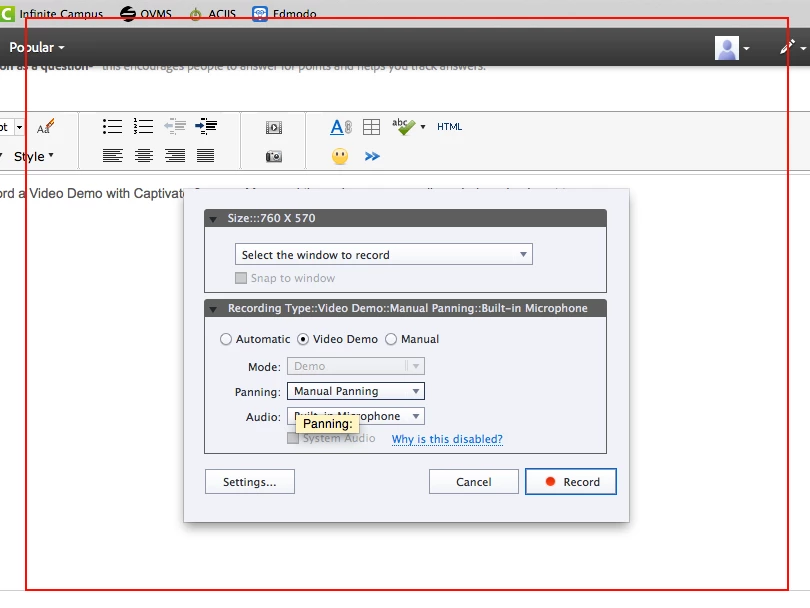
Help! I'm trying to record a Video Demo with Captivate 8 on my Mac, and the red screen recording window size is set to 760 x 570. There are no options for resizing this red window, and I need to record my full screen. What am I doing wrong? Thanks.
    This topic has been closed for replies.

    1 reply

    August 4, 2015

    PS - I just realized that 760 x 570 is also the size of my project. So is there any way to get around limiting the size of my demo recordings?

    RodWard
    Community Expert
    Community Expert
    August 5, 2015

    If you're trying to add a capture to an existing project file from WITHIN that CPTX then you'll have the capture size fixed like this.

    You need to start a new capture project file and THEN you will have control of the dimensions.  After creating the video file you can insert it into another project, but then you're going to need to resize it and that could cause it to lose resolution.

    I would suggest you find out what the optimum size is for a VIMEO video and capture at that size.  Capturing video at full screen is likely to create an unnecessarily huge file size that would likely have playback issues.

    August 5, 2015

    Thank you!