
Participant
August 12, 2011
Question

Can't stop FMR from auto selecting check boxes

  • August 12, 2011
  • 1 reply
  • 391 views

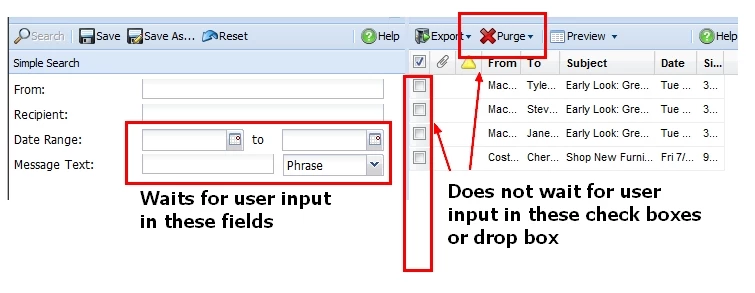
I am creating a FMR in training mode.  I am able to force the participants to enter text in message boxes (such as enter two date ranges and type in the word "green" to start a search).

When the search results appear, I want the FMR to stop again and wait for user input (the user clicks a few check boxes next to each item).  My problem is Captivate auto selects the check boxes and does not wait for the user input.  Captivate then goes on to automatically click open a drop box and selects an item.

Any help is greatly appreciated.

Captivate version 5.0
    This topic has been closed for replies.

    1 reply

    Lilybiri
    Legend
    August 12, 2011

    Hello,

    Perhaps I misunderstand your question, but I think you are mixing two very different things. FMR is pure video. If you want a training simulation the best way to go is Automatic capturing, set to Training Simulation, certanly not FMR. In the Preferences, Recording, Modes you'll see (and eventually you can tweak) the settings that will be used while capturing in that mode. You'll see that for training simulation click boxes will be created for the places you click, whereas for demonstration no click boxes are created, but the clicks are done by CP and highlight boxes are entered.

    Lilybiri

    Wes9781Author
    Participant
    August 12, 2011

    Thanks,

    This is much closer to what I wanted to do.

    Thanks,

    Wes Newman

    720-895-4412