Inspiring
October 30, 2018
Answered

Can't upload second image button

  • October 30, 2018
  • 3 replies
  • 410 views

Hi,

I try to create a image button with a hover state. I can upload one image button for the Normal state but a second image for the Hover state won't work?

Anyone knows the solution or is this just another bug?

    This topic is closed to new replies. Start a new post to keep the conversation going.
    Correct answer Lilybiri

    Image buttons are very old, but they still have to be created the old way. Look in the Gallery to see some of those buttons: you need to create 3 images with specific names, to end in _up, _over, _down. Have a look at one example:
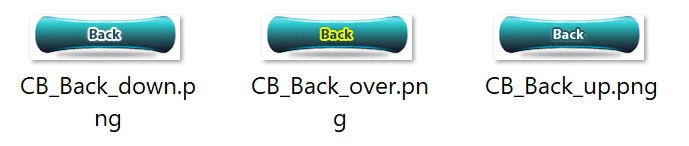
    When pointing to one of those images, Captivate will recognize the other states from those names.

    But please, since over 6 years shape buttons are available, which make it so much easier to create a button with different images in the states. Why do you keep with those legacy types?. A shape button can be filled with an image.

    3 replies

    Lilybiri
    LilybiriCorrect answer
    Legend
    October 30, 2018

    Image buttons are very old, but they still have to be created the old way. Look in the Gallery to see some of those buttons: you need to create 3 images with specific names, to end in _up, _over, _down. Have a look at one example:

    When pointing to one of those images, Captivate will recognize the other states from those names.

    But please, since over 6 years shape buttons are available, which make it so much easier to create a button with different images in the states. Why do you keep with those legacy types?. A shape button can be filled with an image.

    Inspiring
    October 30, 2018

    Thanks for the reply. I tried it out and it works very well Still wondering why the old method is still available in Captivate...

    Lilybiri
    Legend
    October 30, 2018

    I had expected the old buttons to disappear. However shape buttons still cannot be used on quiz slides, where tranaparent button are used in all the themes. No idea why they keep those 'old' workflows,  maybe because so many users continue to use old workflwos and never think about using new, easier features. Sorry, but as a trainer and consultant, I see that happening too much.