
brynnw64403013
Participating Frequently
February 4, 2016
Answered

can you delete part of a video demo?

  • February 4, 2016
  • 1 reply
  • 297 views

I have a video demo slide and want to cut out a small portion in the middle and at the beginning of it. I don't see that this is possible, but I'm a beginner with Captivate, so I might just be missing something.

This topic has been closed for replies.
Correct answer josev6861445

I'm assuming you're on Cp8 or 9...if this is a true video demo, use the split button. You have to set one split at the beginning and another at the end of the section you wish to cut out.

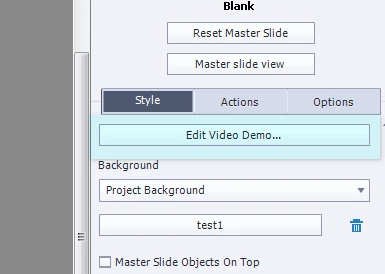
If it's a cpvc slide that's been inserted into a larger project, then look for the "Edit Video Demo" button on the right side (the properties panel); it'll take you to a place where you can edit the video (it looks like what's above).

1 reply

josev6861445
josev6861445Correct answer
Inspiring
February 4, 2016

I'm assuming you're on Cp8 or 9...if this is a true video demo, use the split button. You have to set one split at the beginning and another at the end of the section you wish to cut out.

If it's a cpvc slide that's been inserted into a larger project, then look for the "Edit Video Demo" button on the right side (the properties panel); it'll take you to a place where you can edit the video (it looks like what's above).