


Can you remove the "Highlight box" / "Click box" captions that appear inside them?
Hi there.
I'm working on some system tutorial modules in Captivate 7, which include a lot of click boxes and highlight boxes. Is there any way to get rid of the "Highlight box" / "Click box" captions that appear inside them when you're editing a project? Although this isn't a major issue, it can be rather frustrating, as it covers the text underneath it, which sometimes I need to see to include in callout boxes.
Here's an example of what I mean:
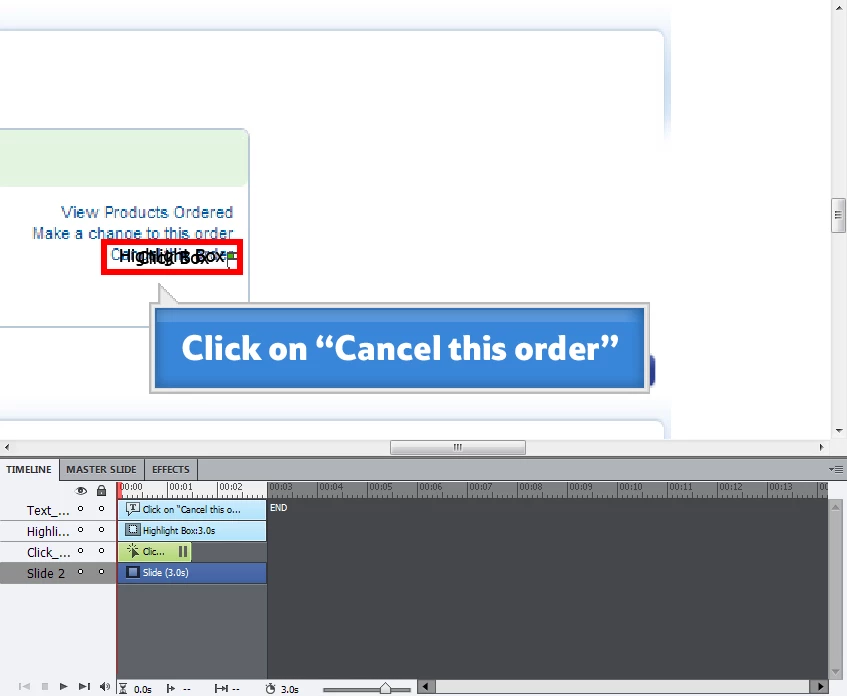
In this example, if I forget what the text says I need to move the highlight and click boxes to be able to read it.
As I say, not a massive issue, but it seems like something that should be easy to do and would make things quicker and easier. I've had a look in the preferences, but can't find anything.
Thanks.
 AdChoices