Participating Frequently
March 18, 2014
Answered

"Cannot apply the new theme" error message

  • March 18, 2014
  • 1 reply
  • 860 views

A few days ago, my themes were working fine in Adobe Captivate 7.  I created a custom theme, and now I can still see the pre-loaded themes in the Themes Panel, but when I click on a theme, I get the same "Cannot apply the new theme" error message no matter which theme I choose, what project I'm in, or if it is a new or existing project. 

When I go to the Master Slide it shows no pre-sets either.

I checked my Adobe Captivate Theme folder and it looks like the only thing in there now are skins (although I'm not sure what was in there before).  I have no idea how everything just disappeared.  I've even tried to uninstall / reinstall the product and for some reason, it does not work.
This topic has been closed for replies.
Correct answer Captiv8r

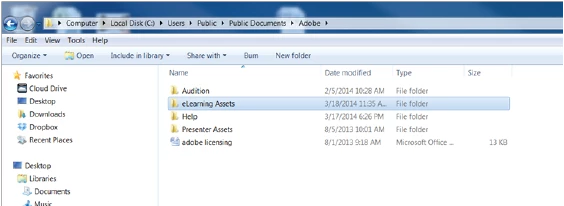
For resetting preferences, I'm not sure how to do that.  Is it in a different folder?  Here is the folder where I deleted the eLearning Assets.  And the folder did reappear after I reopened Captivate but I am still having the same issue:


If you are on Windows, it's pretty easy.

Close Captivate

Right click the shortcut and look at properties.

Notice on the properties is a button to open the location. Click it and Windows Explorer opens.

From the location in Explorer, open the Utils folder.

Double click the CleanPreferencesWin.bat file. (note that you may not see the .bat part, depending on your Windows settings)

Now dismiss the dialog and restart Captivate.

Cheers... Rick

1 reply

Lilybiri
Legend
March 18, 2014

You posted this also on a thread by another user.

When you reinstalled, did you first delete the Public Layouts folder, not the one in the installation folder of CP? Which OS do you use, I'm on Win7, and this is the path to that folder:

You can still delete it now, when you restart Captivate it will be refreshed, recreated. Same question about Preferences....

Lilybiri

mbreathAuthor
Participating Frequently
March 18, 2014

I just tried that, and it did recreate the eLearning Assets folder.  But I still get the same error.  Within that folder I see all of the themes...is it possible to load them in again?  Is it possible that they are trying to pull from someplace else?